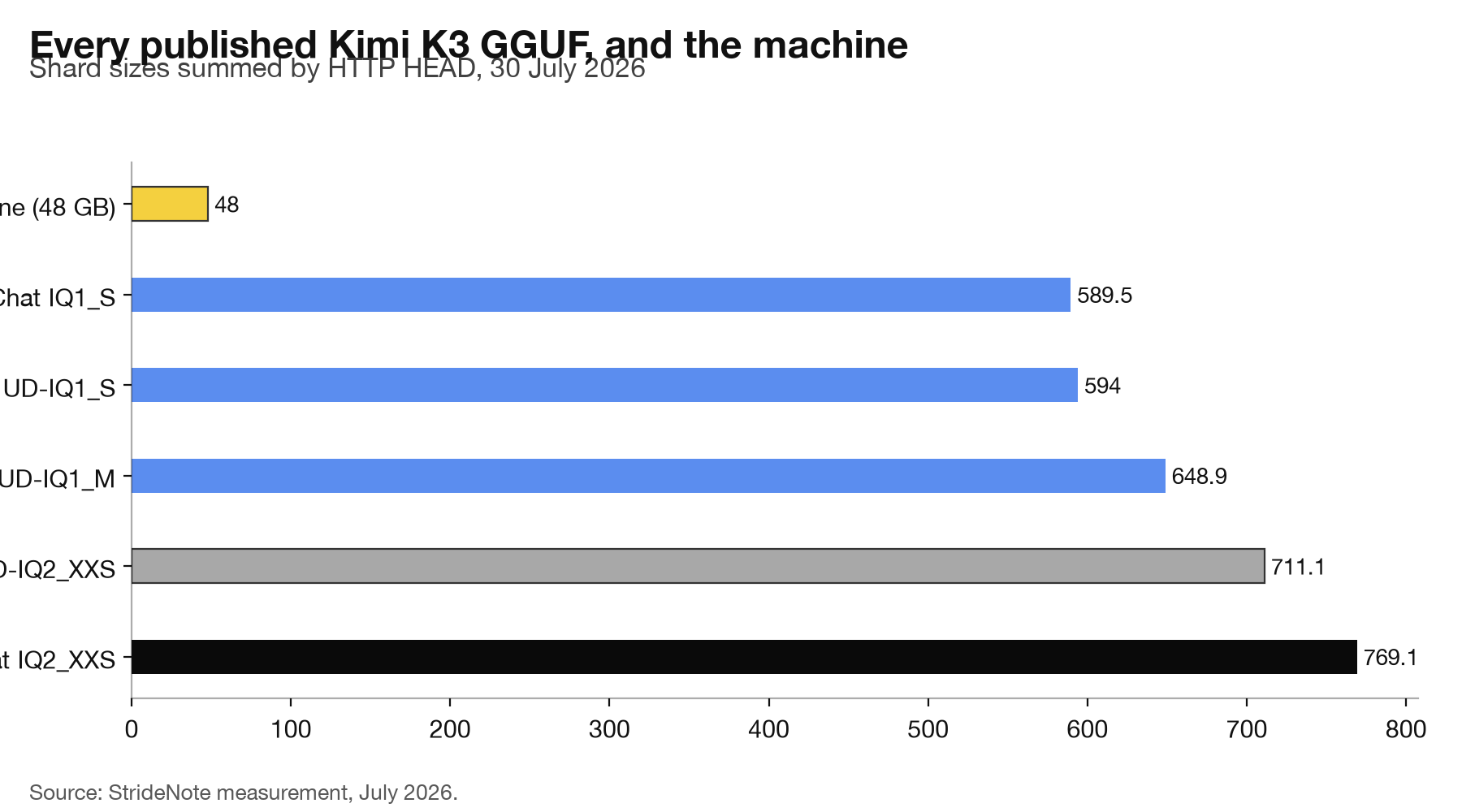
Every open-weights release now arrives with the same question attached, usually within the hour: can I run it on my machine. Kimi K3 landed with open weights on 27 July and community quantisations followed within two days, which is fast enough that the answer is worth working out rather than assuming. Moonshot’s release itself, 2.78 trillion parameters in 1,561 GB, is covered in our report on the Kimi K3 weights. We summed every shard of every published GGUF build. The smallest complete one is 589.5 GB, which is 12.3 times the memory of the machine we would have run it on.
That part is unsurprising. The part worth writing down is that two builds carrying the same quantisation label differ in size by 58 GB, which is more than the entire memory of that machine.
Can you run Kimi K3 locally?
Not on anything you are likely to own.
We measured rather than quoted. Rather than trusting a size printed in a blog post, we requested the headers of every shard of every published build and added them up. That distinction turned out to matter, and we will come back to why.
| Build | Total | Shards |
|---|---|---|
| AtomicChat IQ1_S | 589.5 GB | 14 |
| unsloth UD-IQ1_S | 594.0 GB | 14 |
| unsloth UD-IQ1_M | 648.9 GB | 15 |
| unsloth UD-IQ2_XXS | 711.1 GB | 16 |
| AtomicChat IQ2_XXS | 769.1 GB | 18 |
The smallest complete build is 589.5 GB of weights. That is before the key-value cache, before any runtime overhead, and before the context window that makes the model interesting in the first place.
Against a studio work/test stack with 48 GB of unified memory, the smallest build is 12.3 times the available memory. There is no quantisation trick, no offloading strategy and no clever loader that closes a gap of that shape on that hardware. This is the same conclusion we reached about a different trillion-scale model earlier this month, and the arithmetic is not close enough to argue about.
How big are the Kimi K3 GGUF builds really?
The figure in circulation is that the 1-bit builds run from about 594 GB to about 620 GB. Half of that is right. Our measurement puts unsloth’s UD-IQ1_S at 594.0 GB, which matches the low end exactly.
The upper figure does not match anything we found. The family runs from 589.5 GB to 769.1 GB, and the spread comes from the 2-bit builds, which nobody seems to have added up. If you are budgeting disk or bandwidth from the quoted range, you are short by up to 150 GB.
Why two 2-bit builds differ by 58 GB
unsloth’s UD-IQ2_XXS is 711.1 GB. AtomicChat’s IQ2_XXS is 769.1 GB. Same base model, same nominal quantisation, 58 GB apart.
That is the same phenomenon we found when we read the tensor tables of eight builds of one model and discovered that a file named UD-Q4_K_XL contained no Q4_K at all. These labels describe an intent, not a recipe. Every quantiser decides independently which tensors to protect at higher precision, and on a mixture-of-experts model where the experts dominate the weight budget, small differences in that policy scale into tens of gigabytes.
For a 27B model that difference is an annoyance. At this scale it is the difference between two machines.
How to check a model’s real size before downloading
Our first pass at this got it wrong twice, in ways worth repeating because they are easy to hit.
We started by reading file sizes from the Hugging Face tree API, which is the obvious approach. It returned 13 shards for a build whose filenames declared 16, and 14 for one that declared 18. That looked like two repositories serving incomplete uploads, which would have been a striking finding: anyone downloading them would get a model that cannot load.
It was wrong. The API paginates and silently truncated the listing. We checked the supposedly missing shards directly and every one returned a redirect to the CDN, meaning the files exist. Had we published the first result, we would have accused two people of shipping broken quantisations on the strength of an artefact in a JSON response.
The same truncation produced a second false finding. With three shards missing from the total, unsloth’s 2-bit build appeared to be smaller than its 1-bit build, which would have been a genuine anomaly worth a paragraph. Complete the sum and the ordering is exactly what it should be: 1-bit builds are smaller than 2-bit ones, every time.
So the method that works is dull and reliable. Request the headers of each shard, read the content length, add them up, and confirm the shard count matches what the filenames declare. It costs a few seconds per build and it is the only way to get a number you can defend. The same discipline applied to reading a model file directly is what tells you what is actually inside rather than what the name suggests.
The wider point is not about Kimi K3, which almost nobody reading this will run. It is that the published numbers for these releases are assembled quickly, from each other, in the days when interest peaks and nobody has the hardware to check. The size of a file is the least ambiguous fact a model has, and the circulating version of it was still wrong by 150 GB a week after release.
There is a practical version of this for anyone tracking releases. The window in which a model is most discussed is the window in which the fewest people can verify anything about it, because the hardware to do so does not exist outside a handful of labs. Sizes, memory floors and quality claims all circulate on trust during that period. A number you can check with a header request is the cheapest possible correction, and it stays wrong for weeks when nobody makes it.