A coding agent on a local model spends most of its first minute on something you cannot see. It is reading: the system prompt, the tool definitions and the files it was handed, before a single word comes back. On our test machine that silent read took Qwen3.6 35B-A3B about 75 seconds for a 20,033-token prompt on LM Studio’s llama.cpp engine, and about 30 seconds on its MLX engine. This piece is our MLX vs llama.cpp measurement for that one model, run on 12 October 2026, with the method and the two places where the faster engine got something wrong.
How we tested MLX vs llama.cpp in LM Studio on an M4 Pro
The test machine is an M4 Pro with 48 GB of unified memory on macOS 27.0.1, with LM Studio 0.4.25. LM Studio ships two engines for a Mac. One is llama.cpp, which runs GGUF files on Apple’s Metal backend, and we had version 2.47.0. The other is LM Studio’s MLX engine, version 1.11.0, built on MLX, which Apple’s machine learning research team describes as an array framework for machine learning on Apple silicon. The two are separate projects, which is the reason the answer to whether llama.cpp supports MLX is still no.
We ran the same model through both. On llama.cpp it was the Q4_K_M GGUF file, 22.07 GB on disk. On MLX it was the 4-bit MLX build that the LM Studio team publishes on Hugging Face, 20.4 GB across four files. Both are 4-bit versions of the same Qwen3.6 35B-A3B weights, but they are not the same quantisation, so this compares the two builds a Mac owner would actually download, not the engines on identical numbers.
Each build was loaded alone, with no other model in memory, and each request went to LM Studio’s OpenAI-compatible endpoint from one Python script. The script streams the reply and takes its own timings from the stream, so a figure means the same thing on both engines. Temperature was 0. Every fresh prompt started with a new random session id, because a repeated prompt is answered from the prefix cache and reports a prompt processing speed that is too fast by a factor of 182.
There were four timed tests. The first was a short question of about 72 prompt tokens with a 500-token reply, run three times. The second was the long read: an agent-style system prompt of reference material, eight tool definitions and one question, 20,033 tokens by llama.cpp’s count, run twice. The third added five follow-up turns of about 380 tokens each on top of that long prompt, the way an agent appends tool results. The fourth sent two short requests at the same moment.
How fast is Qwen3.6 35B-A3B on MLX compared with llama.cpp?
MLX was faster on every timed test, and the gap was widest on the long read.
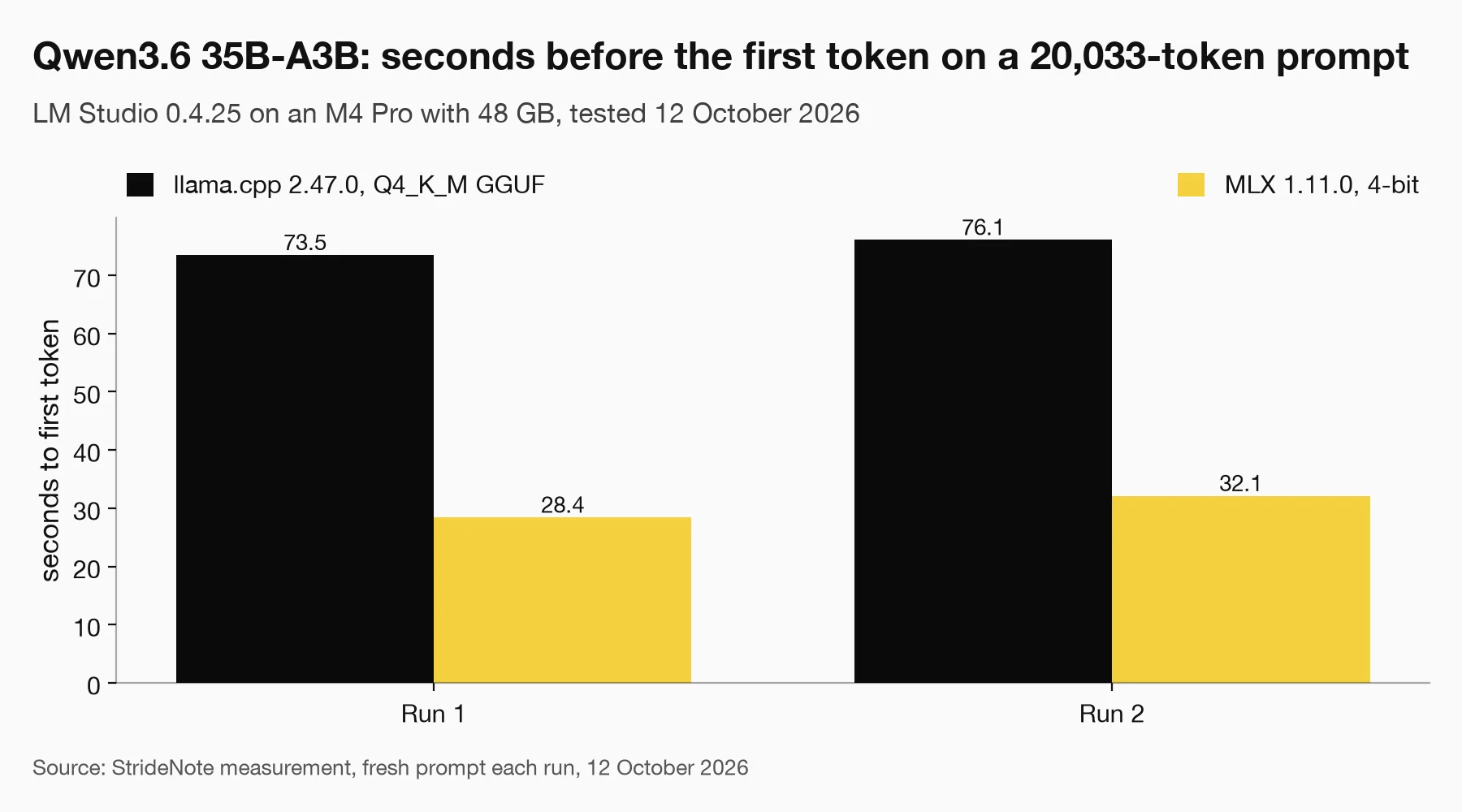
Qwen3.6 35B-A3B, Q4_K_M GGUF on llama.cpp 2.47.0 against the 4-bit MLX build on MLX 1.11.0, time to first token on a fresh 20,033-token prompt. Tested 12 October 2026.
| Test | llama.cpp 2.47.0, Q4_K_M | MLX 1.11.0, 4-bit |
|---|---|---|
| Long prompt, time to first token, run 1 | 73.5 s | 28.4 s |
| Long prompt, time to first token, run 2 | 76.1 s | 32.1 s |
| Long prompt, tokens read per second | 272 and 263 | 705 and 624 |
| Short prompt, tokens written per second | 50.7 and 49.4 | 61.5 and 59.1 |
| Follow-up turn, time to first token | 1.86 to 1.96 s | 1.38 to 1.75 s |
| Two requests at once, tokens per second each | 39.4 and 39.4 | 64.8 and 64.6 |
The long prompt is the headline. Averaged over the two runs, llama.cpp took 74.8 seconds to start answering and MLX took 30.3, which is about 2.5 times faster. Our earlier piece on why a mixture-of-experts model is quick to decode on a Mac covers why Qwen3.6 35B-A3B writes fast for its size. What this run adds is that the engine changes how fast the same model reads.
Writing speed moved less. On the short prompt llama.cpp wrote 50.7 and 49.4 tokens a second, which matches the 50.8 we recorded for this model when we compared Qwen3.6 35B-A3B with Gemma 4 31B in September. MLX wrote 61.5 and 59.1, about 20 percent more. We left the first run of each out of those pairs. The first llama.cpp run came straight after another model had been unloaded and wrote 39.2 tokens a second. The first MLX run was its fastest, at 68.0.
Follow-up turns were close. Once the long prompt was in the cache, each new turn started in under two seconds on both engines: 1.86 to 1.96 seconds on llama.cpp and 1.38 to 1.75 on MLX. A whole turn, with about 60 tokens of reply, took 3.0 to 3.2 seconds against 2.5 to 2.8. Both engines reuse the earlier prompt well, so for a long agent session the 45 seconds MLX saves is paid back once, at the start, and again whenever the prompt changes near its beginning.
With two requests in flight, llama.cpp gave each one 39.4 tokens a second and finished both in 13.4 seconds. MLX gave each one about 64.7 and finished both in 8.4 seconds, the same time a single request had taken.
Does MLX break tool calling, JSON output or vision in LM Studio?
Speed is no use if the agent’s tool calls stop arriving, so the same script ran eleven tool-calling checks on each engine. Eight asked for one specific tool out of eight with specific arguments, such as a calendar event with a start time and a 90-minute duration. One asked a question that needed no tool. One fed a tool result back and asked for the number inside it. The last asked for a tool call at the end of the 20,000-token prompt. Both engines passed all eleven, with the arguments returned as valid JSON.
Structured output was different. We sent three requests with a JSON schema in response_format, the method LM Studio documents for structured output. On llama.cpp all three came back as JSON in the reply. On MLX all three came back with an empty reply and the JSON sitting in the reasoning_content field, with a finish reason of stop. Two more requests without streaming did the same. LM Studio’s bug tracker already holds this behaviour for an earlier Qwen model on MLX, as issue 1971, opened on 27 May 2026 and still open. Anything that reads message.content after asking for a schema will see nothing.
Vision went the other way. We sent each build one image of black text on white, the words KESTREL 5829, and asked for the text. The MLX build returned it. The llama.cpp build returned a sentence about a captcha that was not in the image. That was a single request and we did not repeat it, so we record it as one failed attempt and not as a finding about the GGUF build.
When to switch Qwen3.6 35B-A3B from GGUF to MLX
For an agent that calls tools, the switch is worth it on this machine. The long first read drops from about 75 seconds to about 30, every reply is written about 20 percent faster, and a second request no longer slows the first. Tool calling held on all eleven checks.
Stay on the GGUF build if anything in your pipeline asks for JSON through a schema and reads the reply field, because on MLX 1.11.0 that field came back empty five times out of five. The same applies if you depend on a fixed context size. We asked for 32,768 tokens on both loads, llama.cpp loaded at 32,768, and the MLX build loaded at 183,296 without a warning. Our note on the LM Studio context length default explains why that number decides how a long run ends.
There are limits to what this run shows. Each figure comes from two or three requests on one machine on one day. We did not compare the quality of the answers, and a 4-bit MLX build and a Q4_K_M GGUF file can differ there even when they match on speed. We also did not time loading, because the two builds sat on different drives. What the numbers do support is narrower and still useful: on a 48 GB M4 Pro, the wait before a local agent’s first word is mostly a property of the engine, and for this model it was the larger of the two differences by a wide margin.