Most 27-billion-parameter models arrive as a download you plan an evening around. The Bonsai 27B 1-bit build from PrismML lands in 3.80 GB, about the size of one feature film, and it carries a 262,144-token context window. The weights are published under Apache 2.0 in the Bonsai-27B-gguf repository on Hugging Face, where the model card puts the deployed footprint at roughly 3.79 GB and quotes about 44 tokens per second on an Apple M5 Pro laptop. We downloaded the file, read its tensors directly, and ran it on our test machine with a 48 GB M4 Pro. For a business sizing laptops for local AI, the figure that matters most is memory: a 27B-class model that peaked at 7.60 GB in our CPU test changes which machines can run one at all.
What is inside the Bonsai 27B 1-bit GGUF?
The file holds 851 tensors. Of those, 498 use a custom quantisation type that llama.cpp reports as type 41, PrismML’s Q1_0_g128 format. The remaining 353 are F32. Reading the tensor table directly, the 1-bit tensors account for 3.782 GB and the F32 tensors for 0.0106 GB, so 99.72 percent of the weight bytes in the file are binary.
Across 26.896 billion parameters and 3.792 GB of tensor data, that works out to 1.128 bits per weight for the whole file. PrismML argues in its model card that conventional low-bit builds understate their true average bit-width. Its example is a widely used “2-bit” build of Qwen3.6-27B that is really 2.8 bits per weight. On this file the label and the measurement agree.
The interesting part is what stayed in F32. Every one of those 353 tensors is a normalisation weight, a bias, or a state-space decay term. Only 48 of them have more than one non-trivial dimension, and all 48 are ssm_conv1d.weight tensors shaped [4, 10240], which are small depthwise convolution kernels rather than projection matrices. Every projection in the model is binary: the query, key, value, output and gate matrices, the feed-forward up, gate and down matrices, the token embedding table, and the output head.
That last pair matters. Most low-bit builds keep the embedding table and the output head at higher precision, because both sit at the edges of the network where quantisation error is expensive. PrismML claims its models carry no higher-precision escape hatches. On this file the claim holds, and it holds in the two places where it is hardest to hold.
The architecture itself is declared as qwen35, with 64 blocks, an embedding width of 5,120, 24 attention heads and 4 key-value heads. It is a dense model, not a mixture of experts. It is also genuinely hybrid: 48 of the 64 blocks carry state-space tensors and a fused QKV projection, while 16 blocks use separate query, key and value projections with no state-space component. Those 16 full-attention blocks are every fourth layer, at positions 3, 7, 11 and so on to 63. Three state-space blocks for every attention block is what keeps a 262K context affordable. If you want the wider background on what an architecture label does and does not tell you about a model’s origins, we covered that in our comparison of Gemma 4 31B and Qwen 3.5 27B, and the licence question in open weights vs open source.
How fast is Bonsai 27B on an M4 Pro?
We measured two paths on the same machine. The first is a CPU-only build of PrismML’s llama.cpp fork, compiled locally. The second is LM Studio 2.25.2, which runs the same file on the GPU through Metal.
| Measurement | Result | How it was measured |
|---|---|---|
| Generation, Metal (LM Studio) | 26.99 tok/s mean | 3 chat completions, 26.16 to 27.75 tok/s |
| Generation, CPU only | 10.64 tok/s | llama-bench tg128, 10 threads |
| Prompt processing, CPU only | 38.83 tok/s | llama-bench pp512, 10 threads |
| Peak resident memory | 7.60 GB | CPU build, 4,096-token context |
| Model load time | 8.25 s | LM Studio, cold load |
| Average bit-width | 1.128 bits/weight | tensor table, 3.792 GB / 26.896 B params |
Source: StrideNote hands-on testing on a 48 GB M4 Pro, July 2026.
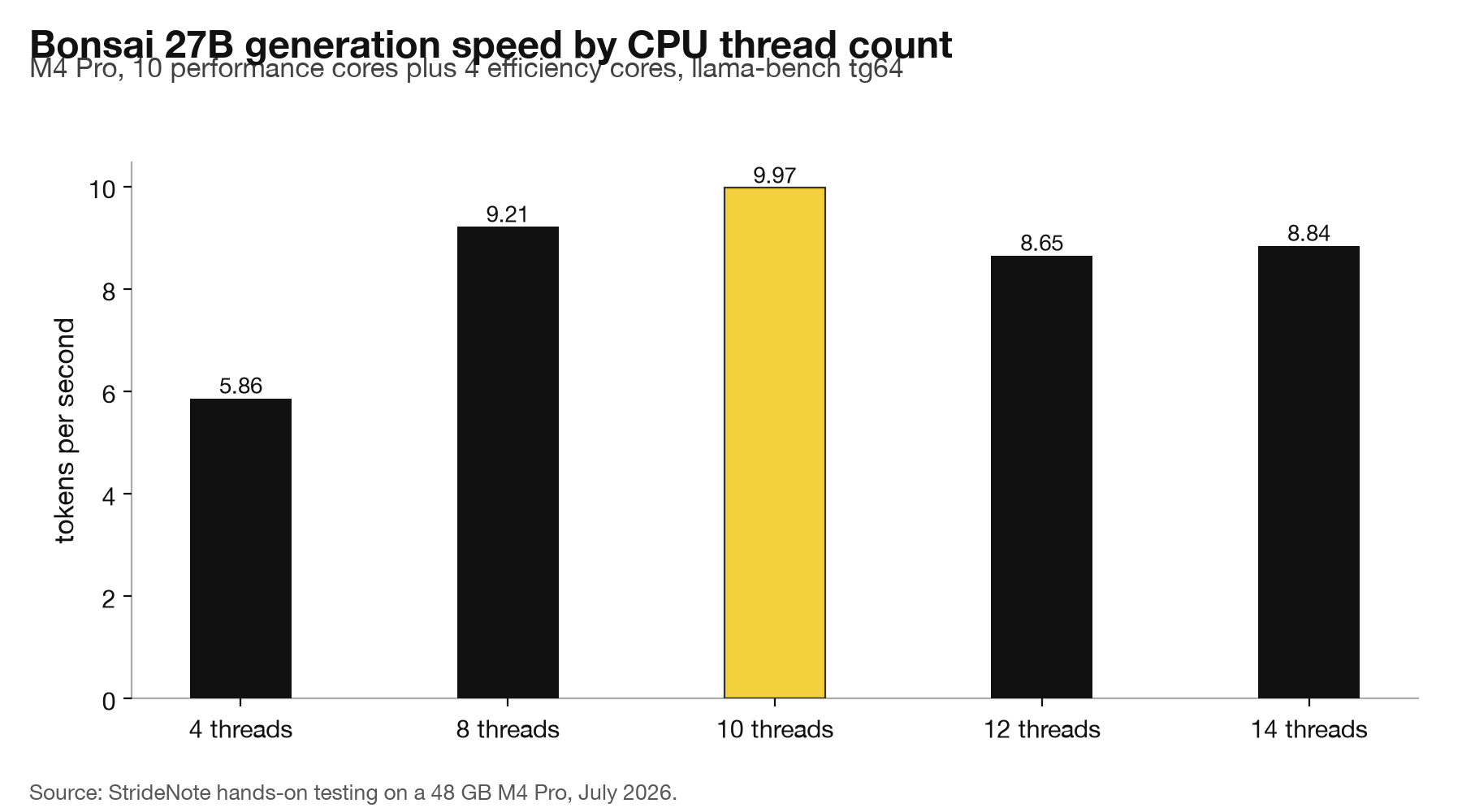
Thread count changes the CPU result more than we expected. Generation ran at 5.86 tok/s on 4 threads, 9.21 on 8, and 9.97 on 10, then fell back to 8.65 on 12 and 8.84 on 14. The M4 Pro in this machine has 10 performance cores and 4 efficiency cores, and the peak sits exactly at the performance-core count. Handing work to the efficiency cores costs about 13 percent. Anyone tuning a local model on Apple silicon should stop at the P-core count rather than the total, a pattern we also saw in our local model benchmarks on the M4 Pro.
Our 26.99 tok/s on Metal is below PrismML’s quoted 44 tok/s, and the gap is explainable rather than suspicious. Their figure comes from an M5 Pro, a generation ahead of this chip, and our run had a 31B model still resident in memory alongside Bonsai. We are not calling the vendor number wrong. We are saying that on previous-generation hardware, under ordinary conditions, a 27B model generates at about 27 tokens per second from a 3.8 GB file.
How to run Bonsai 27B on a Mac without building the llama.cpp fork
The model card directs Mac users to PrismML’s llama.cpp fork for the Q1_0_g128 Metal kernels. That route has a cost the card does not mention. Both Metal build paths in the fork invoke xcrun metal and xcrun metallib to compile the shader library, and neither tool ships with the Xcode Command Line Tools. Our Metal build failed at bin/default.metallib with error 72. Setting GGML_METAL_EMBED_LIBRARY=OFF does not route around it, because that path compiles a metallib too. Full Xcode is the only fix, which is a multi-gigabyte install for a 3.8 GB model.
The CPU-only build has no such requirement. It configured and compiled with cmake and the Command Line Tools alone, in under a minute on 12 cores.
The more useful finding is that the fork turned out to be unnecessary. LM Studio 2.25.2, with its stock bundled llama.cpp engine, indexed the file, loaded it in 8.25 seconds and generated correct output on the GPU. Nothing was patched and nothing was built. For Mac readers, the practical instruction is to drop the GGUF into the LM Studio models directory and load it, which is the same route we recommended in our comparison of LM Studio and Ollama. Readers weighing the engine question more broadly can consult our notes on MLX, llama.cpp and MetalRT on Apple silicon. PrismML also publishes an MLX build for native Apple silicon, which we have not tested.
Why Bonsai 27B spends most of its output on thinking
We gave the model a two-step arithmetic word problem: 12 pens at three for $5, three notebooks at $4 each, paid with a $50 note. Bonsai answered $18, which is correct, and its working was correct at every step on both the CPU and the GPU run.
Getting there took 1,011 completion tokens. Of those, 1,005 were reasoning tokens. The visible answer was three characters long. At 27 tokens per second that is 37 seconds of compute to produce “$18”, with 99.4 percent of the output budget spent inside the thinking block.
This has a sharp practical edge. On an earlier run we capped max_tokens at 400 and the response came back with an empty content field and a finish reason of “length”. The model had not failed and had not produced garbage. It simply had not finished thinking, so nothing had reached the visible channel yet. Any application built on this model needs a token budget sized for the reasoning block rather than the answer, and any timeout tuned for a model that answers in one line will fire before the model speaks.
What hardware does a business need to run Bonsai 27B 1-bit?
The figures in this article are the ones to size against. The file is 3.80 GB. Peak resident memory was 7.60 GB at a 4,096-token context on the CPU build. In our later head-to-head with Gemma 4 31B, Bonsai held a 100,000-token context inside about 11.6 GB. Those are the two numbers to plan around: the short context and the long one.
We have not run Bonsai on a 16 GB machine, so any fit there is arithmetic on our measurements rather than a tested result: 7.60 GB leaves 8.40 GB of a 16 GB machine for macOS and everything else (16 minus 7.60), before the context grows past 4,096 tokens. Running Bonsai on a 16 GB Apple Silicon Mac at a short and a long context, with peak memory, swap and tokens a second recorded, is the test that would settle it, and it is on our list.
LM Studio ran the file on the GPU with its stock engine, so staff machines need neither PrismML’s fork nor a full Xcode install. The setting that does need central control is the token budget. Every request needs room for the thinking block: the arithmetic answer above took 1,011 completion tokens, and a 400-token cap returned an empty answer. In the Gemma comparison a 4,000-token cap emptied a writing task, and 12,000 fixed it. Any internal tool built on this model should set its limit from those figures, not from the length of the answer it expects.
At about 27 tokens a second on Metal, a 1,011-token reply takes about 37 seconds (1,011 divided by 27). Which model to keep loaded when both fit is the question Bonsai 27B vs Gemma 4 31B answers, with the same prompts on the same machine.
When a 1-bit 27B model is worth running locally
The case for Bonsai is memory, not speed. At 3.8 GB of weights and 7.6 GB of peak resident memory at a 4,096-token context, it fits on hardware where a conventional 27B build does not go. PrismML puts a 4-bit build of a comparable 27B model at 17.6 GB of weights and 19.2 GB peak at the same context. That difference decides whether a 27B-class model runs on a 16 GB laptop at all, and our guide to picking a local model for your RAM covers where those thresholds land.
The case against is the thinking overhead. A model that spends a thousand tokens reaching a two-digit answer is a poor fit for autocomplete, for chat that needs to feel immediate, or for any agent loop where latency compounds across steps. Bonsai suits work where the question is hard enough to deserve the reasoning and the wait is acceptable.
What we have not measured is the quality cost of the binarisation itself. Doing that honestly means running the F16 build of the same model as a baseline, and that file is 53.8 GB, beyond what this machine can hold. PrismML reports 92.8 on GSM8K and 87.08 on AIME 2026 for this build, and those figures come from the vendor rather than from us. Until someone runs the paired comparison on hardware that fits both, the retained-quality claim stays a claim.
The thing worth watching is the tooling gap. PrismML shipped a format its own documentation says needs a custom fork, and the fork’s Metal path is gated behind a full Xcode install that most laptop users will not have. Meanwhile a mainstream desktop app already runs the file on the GPU without any of it. The weights arrived ahead of the instructions, and the instructions are now the slower half.
We have since run this model head to head against the 31B that anchors our daily work, with the same prompts on the same machine. The numbers are in Bonsai 27B vs Gemma 4 31B.
Reading the file is one thing and putting it to work is another. We went on to run this model behind a terminal coding agent: Bonsai 27B in a coding agent. It handles tool calls cleanly, and it corrects one number in the token accounting above.
The type-41 tensors above are confirmed as Q1_0 in llama.cpp’s own type enum. We went on to use the same tensor-table method across eight builds of one model in Eight GGUF builds of one model, where a file named UD-Q4_K_XL turned out to contain no Q4_K at all.