A developer opens a config file to check an environment variable. The file contains a database connection string, an API key, a service endpoint. Within seconds, the AI coding assistant has bundled that file into a context window and transmitted its contents to a cloud server. The developer never saw it happen, and no local log recorded the transfer.
In March 2026, GitHub announced that interaction data from Copilot Free, Pro, and Pro+ users would be used to train its AI models unless users manually opted out, according to the company’s privacy update. Private repository code actively being worked on falls within the scope of the policy. GitHub’s own documentation says Copilot inline suggestions combine the code around your cursor with snippets from other open tabs in the editor and send the result to a large language model as a prompt. The practical implication is straightforward: a credential sitting in an open tab can travel to a third-party server with that prompt.
What happens to your code in the cloud?
Every AI coding assistant that runs through a cloud API makes copies of your source code. The copies are temporary in some cases and persistent in others, but in every case the code leaves a machine you control and travels across a network to infrastructure you do not.
GitHub Copilot sends encrypted prompts to GitHub servers, where they are processed and discarded once a suggestion is returned. But that guarantee applies only to IDE-based completions on Business and Enterprise plans. For Copilot Free, Pro, and Pro+ users, interaction data including code snippets, accepted outputs, and surrounding file context can be retained and used for model training starting April 24, 2026. The opt-out is a user-level setting, not an organization-level one. A single team member who does not disable the setting could expose proprietary code through their Copilot interactions, even if the rest of the team opted out.
The same dynamic applies across the ecosystem. Cursor offers a privacy mode toggle, but it is a policy control backed by terms of service, not a technical guarantee that can be verified from the client side. Codeium, which powers Windsurf, offers enterprise self-hosting options, but in cloud mode the behavior is similar to Cursor: a local index, retrieval-augmented context, transmitted to Codeium’s inference servers. The only configuration that keeps code off external servers is the self-hosted enterprise tier.
By GitHub’s own account, Copilot sends more than just the line being typed. For a developer working in a monorepo with configuration files, credential stubs, and database schemas, the exposure surface is larger than most security teams realize.
How do AI coding tools expose more than you expect?
The data transmission problem goes beyond routine inference requests. Research published by the Cloud Security Alliance in April 2026 identified three converging threat vectors in AI coding environments: prompt injection attacks targeting coding assistants, supply chain compromise through skill and extension marketplaces, and source code and credential leakage through AI tool interactions.
The Cloud Security Alliance report found that AI-assisted commits carried a secret leak rate of 3.2 percent compared to a 1.5 percent baseline across all public commits. Secrets related to AI services specifically showed an 81 percent year-over-year increase, with 1.27 million AI service secrets leaked in 2025. Of particular concern for agentic development, 24,008 unique secrets were found exposed in Model Context Protocol configuration files, with 2,117 confirmed valid at the time of discovery.
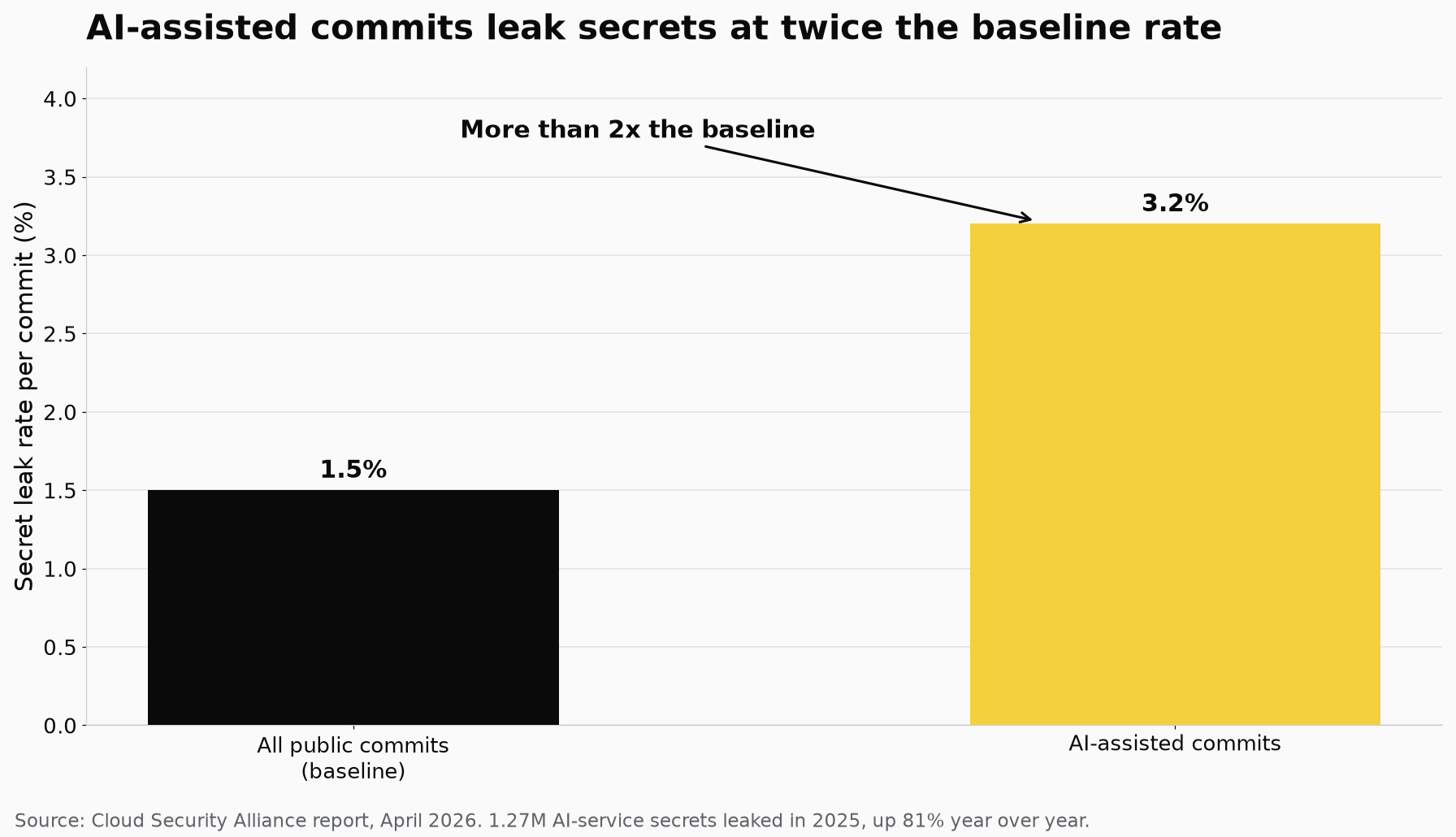
Cloud Security Alliance, April 2026: secrets appear in AI-assisted commits at more than twice the baseline rate.
The report also documented specific vulnerabilities in the tools themselves. CVE-2025-55284, affecting Claude Code prior to version 1.0.4, allowed injected prompts to read .env file contents and exfiltrate them via DNS subdomain encoding. The technique bypassed network egress monitoring. Three additional CVEs were discovered in Anthropic’s official Git MCP server, where path traversal and argument injection flaws exposed repository data.
None of these vulnerabilities required sophisticated access. They activated on repository clone or workspace open, before any user interaction occurred. The attack surface is the tool itself, not the developer using it.
What does a local-only setup actually protect?
Running an AI coding agent entirely offline changes the privacy calculus at a fundamental level. No code leaves the machine. No context window is transmitted across a network. No third-party server receives a copy of your source files, your API keys, or your project structure. The privacy guarantee is architectural, not contractual.
A local setup means the model runs on your hardware through a tool like Ollama, LM Studio, or llama.cpp. The AI agent connects to that local endpoint the same way it would connect to OpenAI or Anthropic, but the request never reaches an external server. The code, the prompts, the generated output, and the session history all stay within the machine’s memory and storage.
This eliminates the four exposure surfaces that cloud-based coding assistants create: the vendor backend where prompts and outputs are processed, the vendor’s safety classifier metadata that may inspect your content, the local client cache that stores session transcripts in plaintext, and the backup snapshots that capture those transcripts indefinitely. A local tool has only one surface, the local machine, and that surface is under your control.
For organizations operating under regulatory frameworks like GDPR, HIPAA, or SOC 2, the distinction matters. A cloud coding tool may offer a Data Processing Agreement and a zero-retention commitment, but those are contractual promises. A local tool that never transmits data in the first place does not need any of them. The compliance question shifts from “what does the vendor commit to” to “what leaves the machine,” and the answer for a properly configured local setup is nothing.
Which local tools are ready today?
The ecosystem of local-first AI coding tools has matured significantly through early 2026. Several projects now offer production-ready agentic capabilities that run entirely offline.
Before you trust one, check two things. It should talk only to a local endpoint such as Ollama or LM Studio, with no telemetry on the side, and it should have a permission system for granular control over file and terminal operations.
The common thread across tools built this way is the same: your code stays on your machine. No backend server receives your prompts. No telemetry service logs your activity. No policy document asks you to trust that your data will not be used for training.
Is local AI powerful enough for real work?
The question that comes up most often is whether local models can match the capability of cloud-based frontier models. The honest answer in mid-2026 is that they do not need to.
Local models crossed a practical capability threshold in early 2026. Qwen3-Coder-Next, Llama 4 Scout, and DeepSeek V3.2 on consumer hardware with 16 to 48 gigabytes of RAM do the work that required GPT-4 two years ago. The industry consensus moved from “local is a toy, cloud is the real thing” to “local is a second brain you run while the expensive cloud model handles the hard calls.”
The dominant pattern in 2026 is hybrid. Developers run local models for routine work: autocomplete, small edits, code review, documentation generation. They route the hardest 10 to 20 percent of tasks to a frontier cloud model through a bring-your-own-key setup. The critical shift is that the developer controls the routing. The default is local. The cloud is the exception, applied deliberately and audited transparently.
For many development tasks, the local model is already sufficient. Autocomplete, refactoring, test generation, bug fixing, and code explanation all work well on models running on a modern laptop with 16 to 48 gigabytes of RAM. The latency is lower because there is no network round trip. The privacy is absolute because nothing leaves the machine. The cost is zero per token after the hardware is purchased.
How do you switch to a privacy-first workflow?
The move from cloud-dependent coding assistants to a local-first setup takes about an hour. Install Ollama, pull a coding model like Qwen2.5-Coder or DeepSeek-Coder, and point your AI agent tool at the local endpoint. Most local-first tools detect Ollama automatically and configure themselves on first launch.
For VS Code users, Continue with a local model provides immediate privacy without leaving the editor.
The practical privacy gain is not marginal. It is the difference between relying on a vendor’s promise that your code will not be used for training and knowing architecturally that it cannot be. The first is a legal commitment subject to change, acquisition, or reinterpretation. The second is a property of the system itself.