Most privacy audits of local AI tools end badly for the tool. We have written a few. So it is worth saying plainly at the top that LM Studio came out of this one better than we expected, and the interesting finding is not a hidden tracker. It is a setting that is on by default, is not concealed anywhere, and quietly changes who sees what you are looking for.
We inspected a running install on a studio work/test stack: an Apple M4 Pro with 48 GB of unified memory, LM Studio serving on its default port with a model loaded.
Does LM Studio send telemetry?
On the evidence of a live install, no, and the claim holds up better than most.
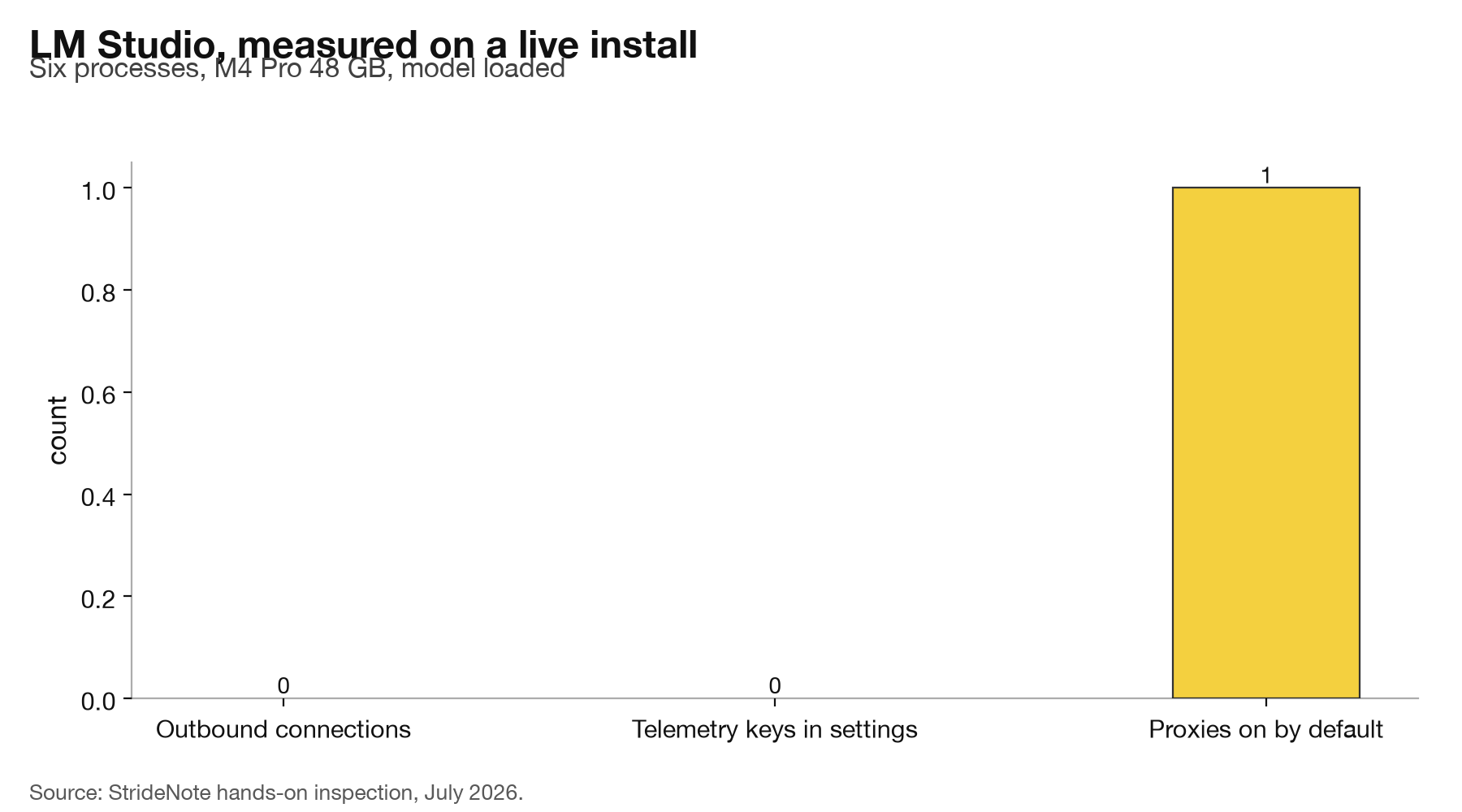
We listed every network connection held by every LM Studio process: the main application, both helper processes, the crash handler, the internal Node utility, and the llama.cpp server it spawns. Six processes. The complete result:
“
LM Studio 127.0.0.1:41343 (LISTEN)
LM Studio 127.0.0.1:1234 (LISTEN)
llama-server 127.0.0.1:63083 (LISTEN)
`
Three sockets, all listening, all bound to localhost. Zero established outbound connections while the app sat running with a model loaded. Nothing was talking to anything.
We then read the application's own settings file, which holds 28 keys. None of them is named for analytics, telemetry, usage reporting, or tracking. There is no anonymous-usage toggle in the file at all, on or off. The privacy policy says conversations, histories and documents stay local and are never transmitted, and nothing we found contradicts it.
That is a better result than the covert tracker we found in a shipping coding tool, and better than the telemetry we mapped in OpenJarvis. Credit where it is due.
One process is worth naming even though it was idle: chrome_crashpad_handler, the standard Electron crash reporter. It held no connection while we watched. A crash reporter by definition transmits on a crash, and we did not induce one, so we cannot tell you what it sends. Treat that as unmeasured rather than clean.
What useHFProxy actually does
Here is the setting. In the settings file, on a default install:
`
useHFProxy = true
“
With that enabled, model search and model download do not go to Hugging Face. They go to model.lmstudio.ai, which mirrors the Hugging Face model API. We confirmed it answers the same shapes of request: a search query against /api/models returns 200, and a repository path under /models/ returns 200.
The practical effect is that when you type a model name into the search box, the request that leaves your machine goes to LM Studio, not to Hugging Face. LM Studio’s servers therefore see which models you look for, which ones you pull, and the IP address doing the looking.
None of this is hidden. The setting is in a plain JSON file with a self-explaining name, the privacy policy discloses that IP and basic device information reach a CDN during model search, download and update checks, and a proxy is a reasonable engineering choice. It gives them a cache, a stable interface, and a way to serve users who cannot reach Hugging Face directly.
But there is a gap between what the tool does and what its users believe. The whole proposition of a local AI application is that your activity stays on your machine. Conversations do. Model discovery does not, by default, and “which models is this person pulling” is a meaningful profile: it says what you are building, roughly how much memory you have, and when you are working.
What we found running on the machine
Three findings, in order of how much they should change your behaviour.
Nothing leaks while you use it. Once a model is loaded, inference is local and the sockets confirm it. If your concern is that prompts or documents leave the machine, we found no mechanism for that and no traffic consistent with it.
Model discovery is proxied by default. This is the finding. It is not telemetry, it is routing, and it produces a server-side record of your model interests either way.
The tokens are empty. Both Hugging Face token fields in the settings were unset on this install, which is the default. Worth checking on yours, because a populated token is a different privacy question: it identifies the account, not just the IP.
We should be clear about the limits of the method. This is a point-in-time inspection of one install of one version on one machine, using connection listing rather than a full packet capture against a local sink. A tool that batches a report every few hours would not appear in a snapshot. The stronger version of this test, which we have run against other tools and would run here given a longer window, is to point the application at a local network sink and record every request it makes over a day of normal use.
How to check and turn it off
The check takes a minute and needs no special tooling.
Read ~/.lmstudio/settings.json and look for useHFProxy. If it is true, your model searches are being proxied. The same file will show whether hfSearchToken and hfDownloadToken are populated.
If you run the headless daemon rather than the desktop app, the same settings file applies, and the headless documentation is where the service behaviour is described. To see the live picture, list the connections held by the application’s processes while it runs. Anything bound to 127.0.0.1 is talking to your own machine. Anything established to an external address is not, and that is the line worth watching.
Whether to change the setting is a judgement about what you are protecting. If you are running local models because you like them, leave it alone; the proxy is convenient and the disclosure is honest. If you are running local models because a client contract or a regulator says inference stays on your hardware, note that the constraint is usually about the data you process, and model discovery is not that. If your threat model includes who knows what you are building, that is exactly what this setting reveals, and it is the one to turn off.
The pattern is the one we keep meeting in local AI and privacy. The alarming-sounding thing, a hidden tracker, was not there. The thing that actually produces a record of your behaviour was a default nobody thinks to look at, sitting in a text file, described accurately, and switched on.