Three hundred and fifty eight times, we caught it talking to a server on port 1234. That server is LM Studio, sitting on the same desk. Zero times, across two passes and nearly two minutes of language-model work, did it open a connection to anything beyond this machine. For a business weighing it for its own code, that settles the privacy question, and the token counts below settle most of the cost one.
Last week we read Graphify’s source and refused to install it, because the package is named graphifyy and installs a binary called graphify, which is the shape a typosquat takes. We wrote that up in the piece where we read the code instead of running it. This is the other half. We installed it deliberately, pointed it at a local model, and watched every socket it opened.
The code said the graph would be built without a language model and that nothing would leave the machine. We can now say what the code said was true.
What does Graphify actually build?
We gave it something fair: Graphify’s own source. Nine Python files, 504,763 bytes, about 51,617 words. Its own report called the corpus “large enough that graph structure adds value,” which is the sort of thing a tool says about itself, so we checked the output rather than the boast.
One command, graphify update ., produced 425 nodes, 892 edges and 21 communities in 1.5 seconds. It wrote three files: an interactive graph.html at 374 KB, a queryable graph.json at 390 KB, and a 9.7 KB Markdown report. The report grades its own confidence, which we did not expect: 98% of edges extracted directly, 2% inferred, none ambiguous, with the 19 inferred edges carrying an average confidence of 0.77.
The queries work. Asking for the shortest path between two files returned a real answer with the provenance of every hop attached:
cache.py --contains [EXTRACTED]--> check_semantic_cache()
  <--calls [INFERRED]-- dispatch_command()
  --calls [INFERRED]--> _score_nodes()
  <--contains [EXTRACTED]-- serve.py
Four hops, and it tells you which two it is guessing about. An agent grepping its way through a repository does not get that, and neither do you.
One note for anyone reading along with the documentation. The graphify extract command that the README describes does not appear in graphify --help. We went looking for it, failed to find it listed, and assumed for a while that it had been dropped. It has not. Type it and it runs. The command exists and the help text does not know about it.
What to check when Graphify says no LLM needed
Check the token counter, and then check the network.
Graphify prints “no LLM needed” when it rebuilds a code graph, and its own report carries a line reading Token cost: 0 input, 0 output. Both of those are the tool marking its own homework. So we ran the code pass with a socket monitor polling every process it spawned.
Zero connections to any remote address. Not one. The parse is tree-sitter walking an abstract syntax tree, it is deterministic, and your source code genuinely does not travel to become a graph. That matches how we think about proving rather than promising that data stays put.
Then we ran the pass that does need a model, and pointed it at our own.
Does Graphify work with LM Studio?
Yes, and it needed nothing but three environment variables.
We set OPENAI_BASE_URL to http://localhost:1234/v1, named the model we had loaded, and put any non-empty string in the key field, which is what local servers expect. Then graphify label --backend=openai went away and named all 22 communities using Gemma 4 31B on the machine under the desk.
It took 112.4 seconds and cost 2,069 input tokens and 1,312 output tokens. During those 112 seconds our monitor sampled its open sockets 358 times and found LM Studio every time.
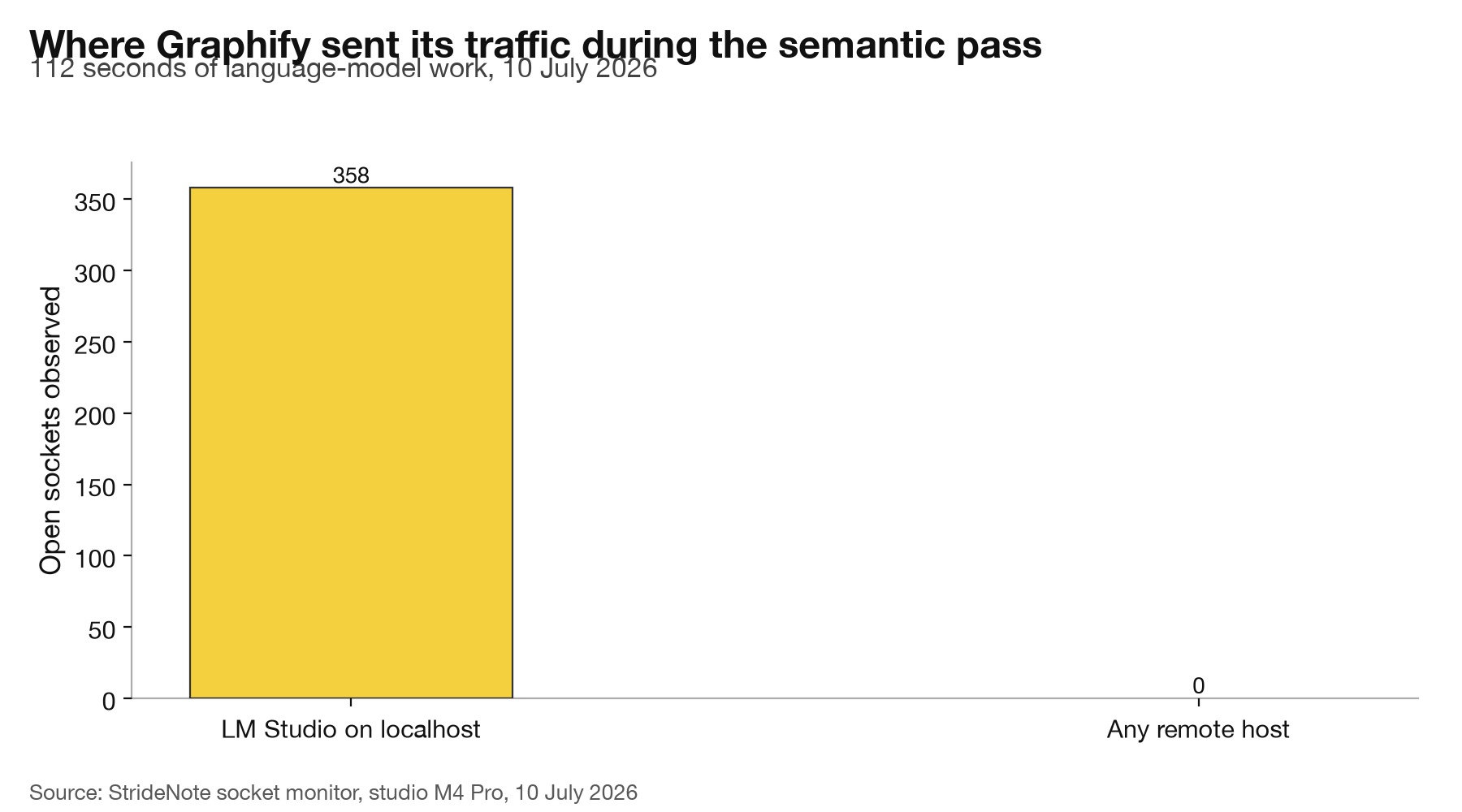
Every socket Graphify held open during 112 seconds of language-model work. Studio test machine, M4 Pro, 10 July 2026.
The distinction that matters is what each pass costs you.
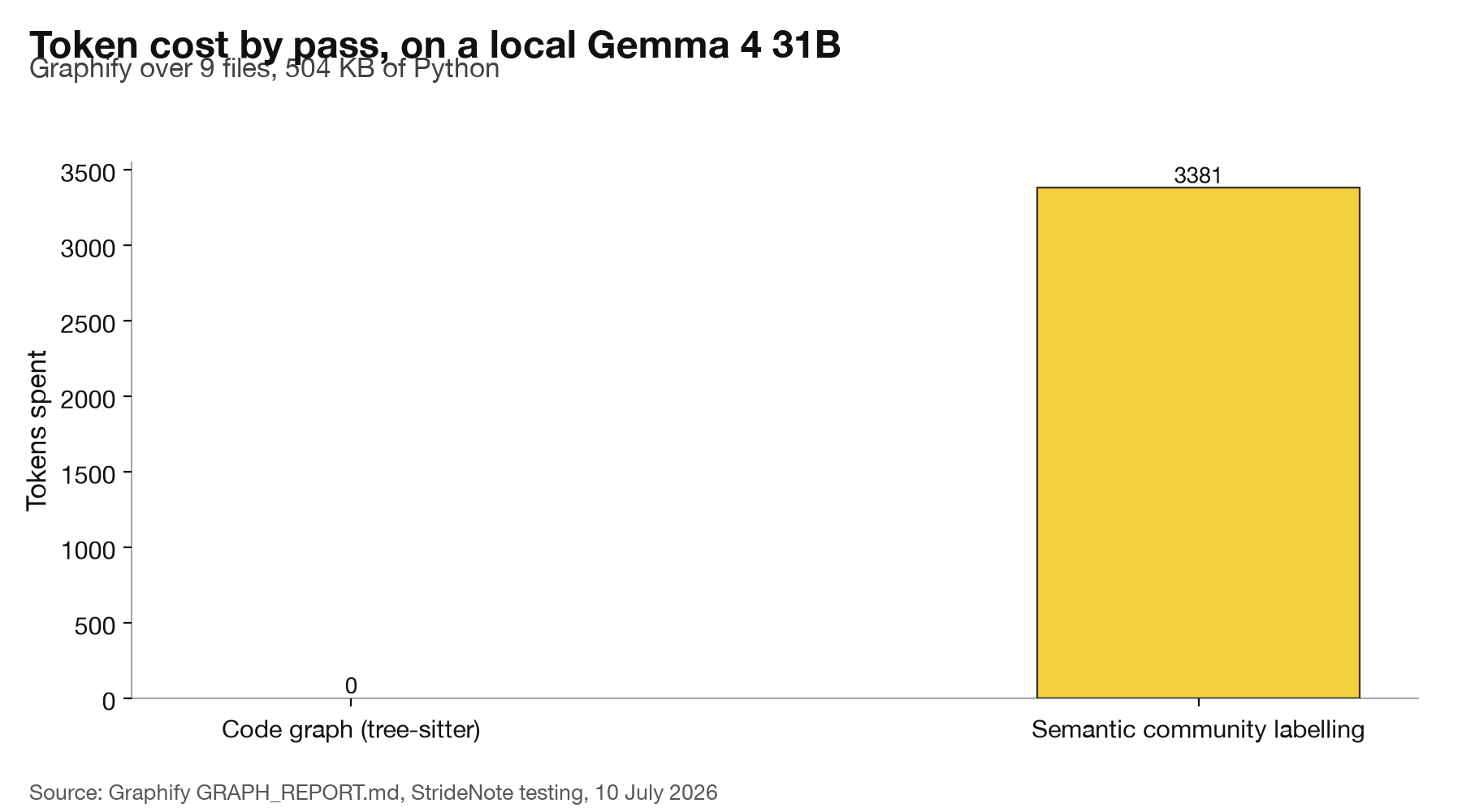
The code graph is free. Only the semantic pass over communities spends anything, and it spent it locally. StrideNote hands-on testing, 10 July 2026.
The names the local model produced were not filler. Community 0 came back as “API Server”, which is serve.py. Community 1 was “Caching System”, which is cache.py. It found “CLI Command Dispatch”, “LLM API Clients”, “Semantic Extraction” and “Git Hooks Management”, and each one landed on the file you would have named yourself. A 31B model quantized to run on 48 GB of unified memory did the job that the documentation assumes you will hand to Gemini.
Which brings us to the one thing that nagged.
Where does Graphify push you toward the cloud?
At the end of the free pass, in the last line it prints.
Finish a code-graph rebuild and Graphify says: set GEMINI_API_KEY or GOOGLE_API_KEY to use Gemini for semantic extraction. That is the tip. There is no accompanying line telling you that OLLAMA_BASE_URL defaults to your own machine, or that OPENAI_BASE_URL will happily point at LM Studio, both of which are true and both of which are buried in a table in the README.
We want to be fair about the size of this complaint. Nothing is hidden, nothing is forced, and there is no telemetry anywhere in the package, which is more than we can say for either of the coding tools we inspected the same way. But the default suggestion at the moment of maximum receptiveness, when the tool has just finished and is telling you what to do next, points at a cloud API. The local path works better than advertised and is advertised less.
What would a Graphify local model run cost through a cloud model?
On our run, very little either way. The code graph spent no tokens at all and took 1.5 seconds. Only the semantic pass used a model: 2,069 input tokens and 1,312 output tokens to name 22 communities, in 112.4 seconds on Gemma 4 31B, or about 5.1 seconds per community.
Graphify’s own tip points at Gemini, so we priced the same token counts at Google’s published rates. Those prices, read on 17 October 2026, list Gemini 3.8 Flash at $0.75 per million input tokens and $3.75 per million output tokens, and Gemini 2.5 Pro at $1.25 and $10.00 for prompts up to 200,000 tokens. Our 2,069 input and 1,312 output tokens at those rates come to about $0.0065 on Gemini 3.8 Flash and about $0.016 on Gemini 2.5 Pro. We do not know which Gemini model Graphify would pick by default, so treat those as two points on a range.
On a corpus this size the money is small either way. The difference that matters to a business is where the semantic pass sends its input: to a machine on the desk, as we watched, or to Google’s servers, if the key is set. For a client codebase or anything under a confidentiality agreement, that is the question to put to whoever owns the data.
Our corpus was nine files of Graphify’s own source, about half a megabyte. We have not run Graphify on a repository of business size, so we have not measured how the token count, the index time or the local labelling time grow with it, and we give no cloud cost for a real repository. That run is the test that would settle it, and it is on our list. In the meantime the code pass is free and local, so run it first, read the community count it reports, and run the semantic pass on a small part of the repository before committing the whole.
Should you run Graphify on your own repo?
On the evidence, yes, with two caveats and one instruction.
The instruction is to install it by name, deliberately, and to notice what you are typing. The package is graphifyy. The binary is graphify. Our own supply-chain tooling refused the install the first time and it was right to: a doubled letter installing an undoubled binary is indistinguishable from an attack until you check. It took uv tool install "graphifyy[openai]" 1.7 seconds and 137 MB to land two executables on the path.
The first caveat is that a knowledge graph is only worth building over a corpus large enough to have structure worth finding. Nine files was enough to be interesting. A three-file script is not.
The second is the star count. When we read the source it had 81,050 GitHub stars. Twenty minutes later, 81,491. Nothing we ran tells us anything about whether 81,000 people found this tool useful, and we are not going to pretend otherwise. What we can tell you is that the 493 KB of Python behind those stars does exactly what it says: it parses your code without a model, it will talk to whichever model you point it at, and on our machine it never once tried to talk to anyone else.
That is the whole test. It is a small claim and we made it the expensive way, by installing the thing, running two passes over half a megabyte of Python, and watching 358 sockets to be sure. The engine question was settled months ago on this desk, and it turns out the answer holds for tools we have only just met.
We have not adopted it. We have stopped being suspicious of it, which is a different thing, and it took a firsthand run to get there.