We typed the install command and our own tooling refused to run it. The package is called graphifyy, with two letters y, because graphify is not available on the Python package index. A supply-chain check looked at that doubled letter, noted that nobody had asked for this specific package by name, and stopped. It was right to. That is exactly the shape a typosquat takes.
So we did the other thing. We read the source.
What we found is a tool that is better behaved than either of the two AI coding tools we wrote about this week, wrapped in a public presence that would fail our own three checks. Both of those sentences are true at once, and neither of them is a verdict, because we have not run it. For a business deciding whether its developers may install Graphify, the same reading gives a set of checks a security review can run on any fast-rising open-source tool.
What is Graphify, and who actually builds it?
Graphify turns a folder into a knowledge graph that an AI coding assistant can query. Rather than letting an agent grep its way around your repository one file at a time, it parses the whole thing ahead of time: source code through tree-sitter, prose and papers through a language model, diagrams through a vision model. The result is a graph of what exists and how it connects, exported as an interactive HTML page, a queryable JSON file, and a Markdown report.
The repository sits at github.com/Graphify-Labs/graphify, MIT licensed, written in Python, requiring 3.10 or newer. It was created on 3 April 2026. When we first read it on 9 July it had 81,050 stars and 7,976 forks. When we checked again while writing this, roughly twenty minutes later, it had 81,491 stars and 8,018 forks. It gained 441 stars while we were reading its source.
That growth rate is the first thing worth sitting with. A three-month-old Python package with 81,000 stars would be among the fastest-climbing repositories in the history of the platform. The fork count of 8,018 is the number we trust more, because forks take effort and stars take a click. Eight thousand forks is real engagement. We are reporting both figures with the date attached and leaving the interpretation open, because we have no way to audit how a star was earned.
The package ships fifteen skill files, one per assistant. Three of them are for tools we already run: OpenCode, Pi, and OpenClaw. That is not a coincidence of taste. It is a project that has aimed itself squarely at the local, open coding-agent stack.
Why did our install of graphifyy get blocked?
Because the package name is shaped like an attack.
The command in the documentation is uv tool install graphifyy. The command-line tool it installs is called graphify. The mismatch exists because the obvious name was taken, or unavailable, or never claimed: a request to the Python package index for a package called graphify returns a 404 today.
None of that means the package is malicious. It means the package is indistinguishable, from the outside, from the thing a malicious package would do. A doubled letter in a package name, installing a binary under the undoubled name, is the textbook description of a typosquat. Our tooling could not tell the difference and neither could you, and the correct response to that is to stop and check rather than to shrug.
We stopped. We have not installed it. Everything below comes from the published source.
Does Graphify phone home?
No, and we looked properly.
We pulled nine of the sixty-five files in the package directly from the repository, 493 KB of Python covering the command line, the installer, the hooks, the cache, the ingestion layer, the model layer, and the MCP server. Then we searched all of it for the names of every analytics vendor we could think of, plus the words telemetry, tracking, and usage statistics.
Zero hits. The only match for the string “segment” is a function that splits Chinese text for search indexing.
We then listed every outbound address hard-coded anywhere in that source. There are eight, and all but two are the API endpoints of language-model providers you would have to deliberately select: OpenAI, Anthropic, DeepSeek, Moonshot, Azure OpenAI, and Google. The remaining two are export.arxiv.org and publish.twitter.com/oembed, which exist because the tool ingests research papers and social posts on request. There is no beacon. There is nothing to switch off, because there is nothing switched on.
Set that against the two tools we inspected the same way this week.
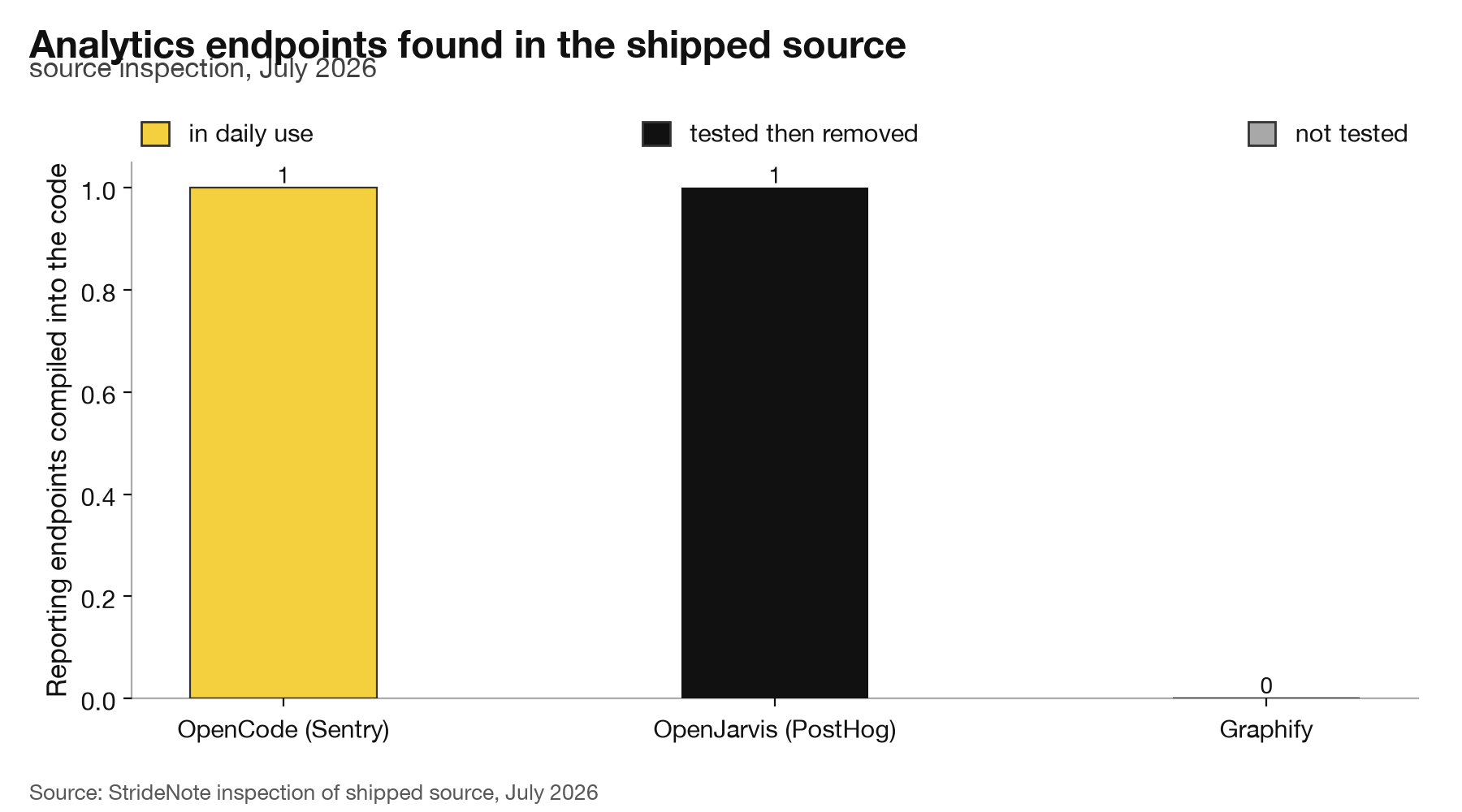
One endpoint each for the tools we use and tested, none for the tool we have not run. Source inspection of the shipped code, StrideNote, July 2026.
OpenJarvis ships PostHog analytics enabled by default, with a hard-coded project key, and an off switch that works but is documented nowhere. OpenCode initialises a Sentry client unconditionally at startup, with a compiled-in DSN and, across 41 environment flags, no way we could find to disable it. Graphify has neither. For a project we are otherwise treating with suspicion, that is a striking result, and it is the kind of thing you only learn by opening the files.
Update, 19 October 2026: OpenJarvis merged a change on 14 October that makes its analytics opt-in. The comparison here describes the version we read in July.
Can Graphify run on a local model?
Yes, and more of it runs without a model than we expected.
The code graph is built by tree-sitter, parsing abstract syntax trees. That pass is deterministic, involves no language model at all, and touches no network. Your source code does not leave the machine to become a graph. Only the semantic pass over documentation, papers and images calls a model.
That model can be yours. The backend table in llm.py declares ollama with a default address of http://localhost:11434/v1, and an openai backend whose base URL is an environment variable, with a comment naming llama.cpp, vLLM and LM Studio as the servers it expects to find there. Local servers, the documentation notes, accept any non-empty string as an API key.
So the shape of a private run is clear from the code: point OPENAI_BASE_URL at LM Studio on port 1234, name the model you have loaded, and the only things that ever leave your machine are the arXiv papers you explicitly ask it to fetch. That is a stronger privacy position than most of the tools in this category, and it lines up with how we think about proving, rather than promising, that data stays put.
We want to be precise: this is what the source says it does. We have not watched the packets.
How should a business vet Graphify before approving it for developers?
Graphify is the kind of tool that reaches a developer’s machine before anyone in security has heard of it, so the approval question often comes after the install. The source reading above gives a business four checks it can run on Graphify, or on anything like it, before saying yes.
Match the package to the repository. The documented install is uv tool install graphifyy, with the doubled letter, and the plain name returns a 404 on the Python package index. Approve the exact name the repository’s README gives, pin the version, and block near-miss names in whatever package proxy the team uses.
Confirm the official home. The repository’s homepage field points at graphifylabs.ai. graphify.net, covered below, is not linked from the project and quoted a star count that the GitHub API contradicted by a factor of twenty-two, so it is not the page staff should download from or read documentation on.
Decide where the semantic pass runs before anyone runs it. The code graph is built locally by tree-sitter. Documents, papers and images go to whichever model backend is configured, and six of the eight addresses hard-coded in the source belong to commercial model providers. Pointing the tool at a local server such as LM Studio keeps that material on the machine; choosing a provider sends it to that provider, under that provider’s terms.
Then watch it run once. Reading the code shows what a tool can contact; only a network capture shows what it does contact. We ran that test afterwards, with Graphify pointed at LM Studio, in Graphify on a local model: we ran it and watched the network. A business repeating it needs a folder of files nobody minds the tool reading and a listing of the sockets the tool opens while it works.
Should you install Graphify?
Not on the strength of this article, and not from the website you probably found.
Search for this project and you may land on graphify.net. We did. It presents itself as the project’s home, and it is not: the repository’s own homepage field points at graphifylabs.ai, and the README does not mention graphify.net even once. The two sites also disagree about the most basic fact available. One of them says the project has 3.7 thousand stars. The API says 81,491.
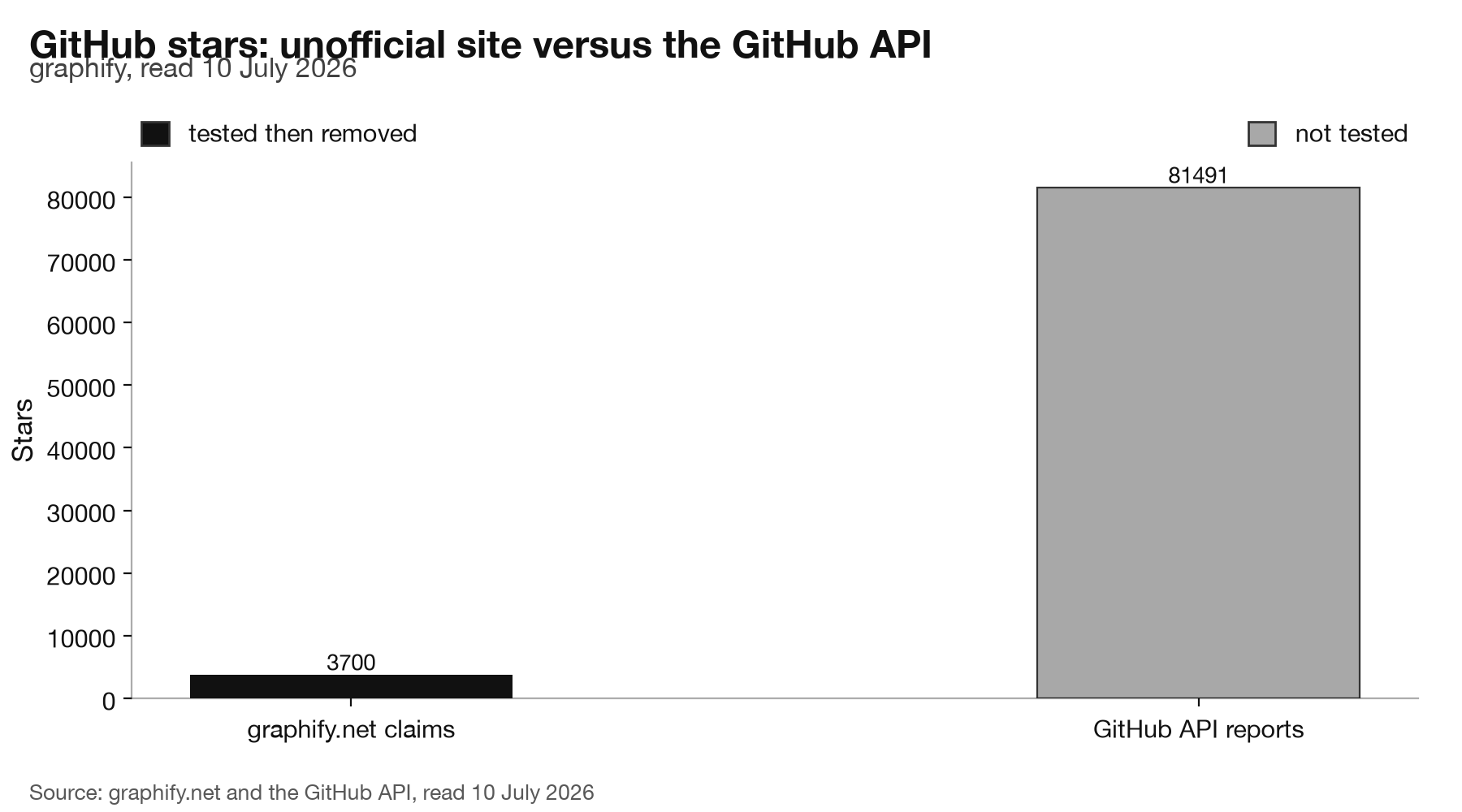
The unofficial site undercounts by more than twenty times. GitHub API, read 10 July 2026.
Marketing sites overstate. This one understates by a factor of twenty-two, which is a stranger error and a worse sign, because it suggests a page nobody is maintaining and nobody official is watching. When the front door of a project is a site the project does not link to, quoting a number the project’s own API contradicts, you are not looking at the project. You are looking at something standing in front of it.
None of this makes Graphify bad software. The evidence in the code points the other way: a permissive licence, no analytics, a local-first parsing path, an install command the maintainers themselves warn you to run through uv rather than pip. It has 452 open issues and 179 releases since April, which is the profile of a project being used hard rather than abandoned.
What it means is that the three questions we ask before adopting anything, the same three we always ask, have two clean answers and one that is still open. Can it run locally and keep our data? The source says yes. Is it maintained and openly licensed? Demonstrably. Is it what it appears to be? We do not know yet, and the gap between the repository and the website is precisely where that question lives.
The next step is the one our own tooling stopped us from taking. Install it deliberately, by name, into an isolated environment. Point it at LM Studio. Run it over a folder that holds nothing we would mind losing. Watch the network while it works. Then check whether the graph it builds is worth the 493 KB of Python that built it.
Until we have done that, the honest position is the one we are taking now: we read the code, we liked what the code said, and we have not seen it run. A tool that gained 441 stars in the twenty minutes it took to read its source deserves that much scepticism, and a project that ships no telemetry at all deserves the chance to earn its way out of it.
We have since done exactly that. We installed it by name, pointed it at LM Studio on this machine, and watched every socket it opened while it worked. The result is the other half of this piece: running Graphify on a local model, and what the network showed.