
MuJoCo on Mac installs faster than it takes to read this paragraph: one pip command, 4.9 seconds. MuJoCo is the physics engine Google DeepMind maintains for robot simulation, and on a Mac the obvious next step, opening the viewer, fails with an error that names a program called mjpython. We installed MuJoCo 3.13.0 on our test machine, a 48 GB M4 Pro, ran it, hit two errors, and measured it: about 63,000 physics steps a second on one core for MuJoCo’s standard humanoid, and 3,014 times faster than real time across ten. This is how to install and run it, with both fixes.
How to install MuJoCo on Mac with pip
We used the Python that comes from python.org, version 3.13.2, and a fresh virtual environment, which keeps MuJoCo away from everything else on the machine:
python3 -m venv .venv-mujoco
.venv-mujoco/bin/pip install mujoco
That took 4.9 seconds and installed MuJoCo 3.13.0, 53.2 MB on disk, with eight dependencies: absl-py, etils, fsspec, glfw, numpy, pyopengl, typing_extensions and zipp. With them, the environment holds 107 MB of packages. There was no Homebrew step, no compiler and no disk image to mount. The package is built for Apple Silicon, and it puts a second command next to python in the environment’s bin folder, called mjpython, which matters in a moment.
To check the install:
.venv-mujoco/bin/python -c "import mujoco; print(mujoco.__version__)"What the pip package does not include is anything to simulate. The sample models live in MuJoCo’s GitHub repository, so we fetched the standard humanoid model at the tag that matches the installed version. It loads in 3 milliseconds: 27 degrees of freedom, 21 actuators and a 5 millisecond timestep.
Why the MuJoCo viewer needs mjpython on macOS
Most scripts that show a robot on screen use MuJoCo’s passive viewer. Run one with plain python on a Mac and it stops before any window opens:
RuntimeError: `launch_passive` requires that the Python script be run under `mjpython` on macOSMuJoCo’s Python documentation gives the reason. macOS requires the main thread to be the one that does the rendering, and mjpython is a launcher built to work around that. It accepts the same arguments as python, so the fix is one word:
.venv-mujoco/bin/mjpython your_script.pyThe rule applies only to the interactive viewer. Rendering to an image, with no window at all, works under plain python with no settings changed. mujoco.Renderer drew the humanoid at 187 frames a second at 640 by 480 on our machine, and every video in this piece was made that way.
How to fix mjpython permission denied on a Mac
The first time we ran mjpython, it refused:
zsh: permission denied: .venv-mujoco/bin/mjpythonThe file was marked executable. The problem was the folder it lived in. The mjpython inside a virtual environment is a short script whose first line is the full path to that environment’s Python, and our path contains a space. That first line cannot contain a space. macOS cuts it at the space and tries to run the part before it. In our path, that part happens to be a real folder, so the error says permission denied. The message changes with the folder names. We repeated the install in a folder called “Robot Sims”, where the part before the space does not exist, and zsh reported “bad interpreter” and “no such file or directory” instead. It is the same fault, with the same fixes.
There are two fixes. The one we used hands the launcher to Python directly:
.venv-mujoco/bin/python .venv-mujoco/bin/mjpython your_script.pyThe other is to create the virtual environment in a path with no spaces, where mjpython runs as it is. We checked both. With the first, the viewer opened and ran our test scenes in real time.
How fast is MuJoCo on an M4 Pro?
We timed MuJoCo’s humanoid falling with no control input, over 20,000 steps, and took the median of repeated runs. MuJoCo’s own speed tool, testspeed, adds slight random noise to the controls by default, so its figures and ours are not the same test.
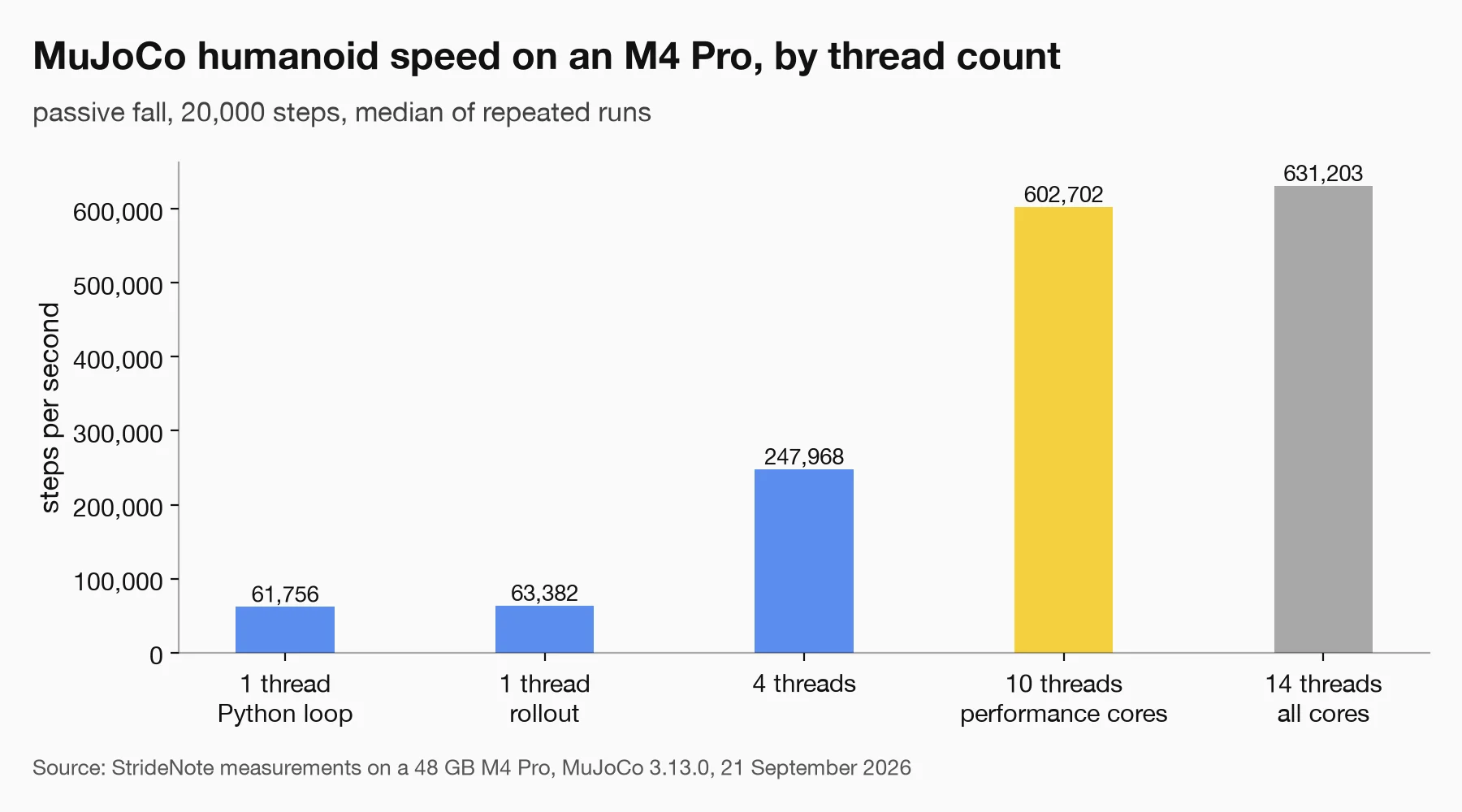
Speed scales almost in proportion to the ten performance cores. The four efficiency cores add about 5 per cent. Measured on our test machine.
One core managed 61,756 steps a second from a plain Python loop and 63,382 with MuJoCo’s rollout module, which runs the loop in C. For a model this size, Python’s overhead barely registers. Spreading independent simulations across threads scaled almost in proportion up to ten threads, the number of performance cores in an M4 Pro: 602,702 steps a second, or 3,014 times real time. Adding the four efficiency cores raised that by about 5 per cent, to 631,203. The chip we used is the one we compared in our M4 Pro and M5 Max test.
The robot models were slower. Unitree’s H1 ran at 60,506 steps a second. Unitree’s G1, from Google DeepMind’s model collection, ran at 38,596 steps a second on one core, 77 times real time, and 22,053 with its hands attached. EngineAI’s T800 ran at 29,490. In a batch run we simulated 16 humanoids for three seconds each, from different starting velocities, and the whole batch finished in 30 milliseconds.
Sixteen humanoids, three seconds each, simulated together in one call on 10 threads in 30 milliseconds, then rendered offscreen. Measured on our test machine, 21 September 2026.
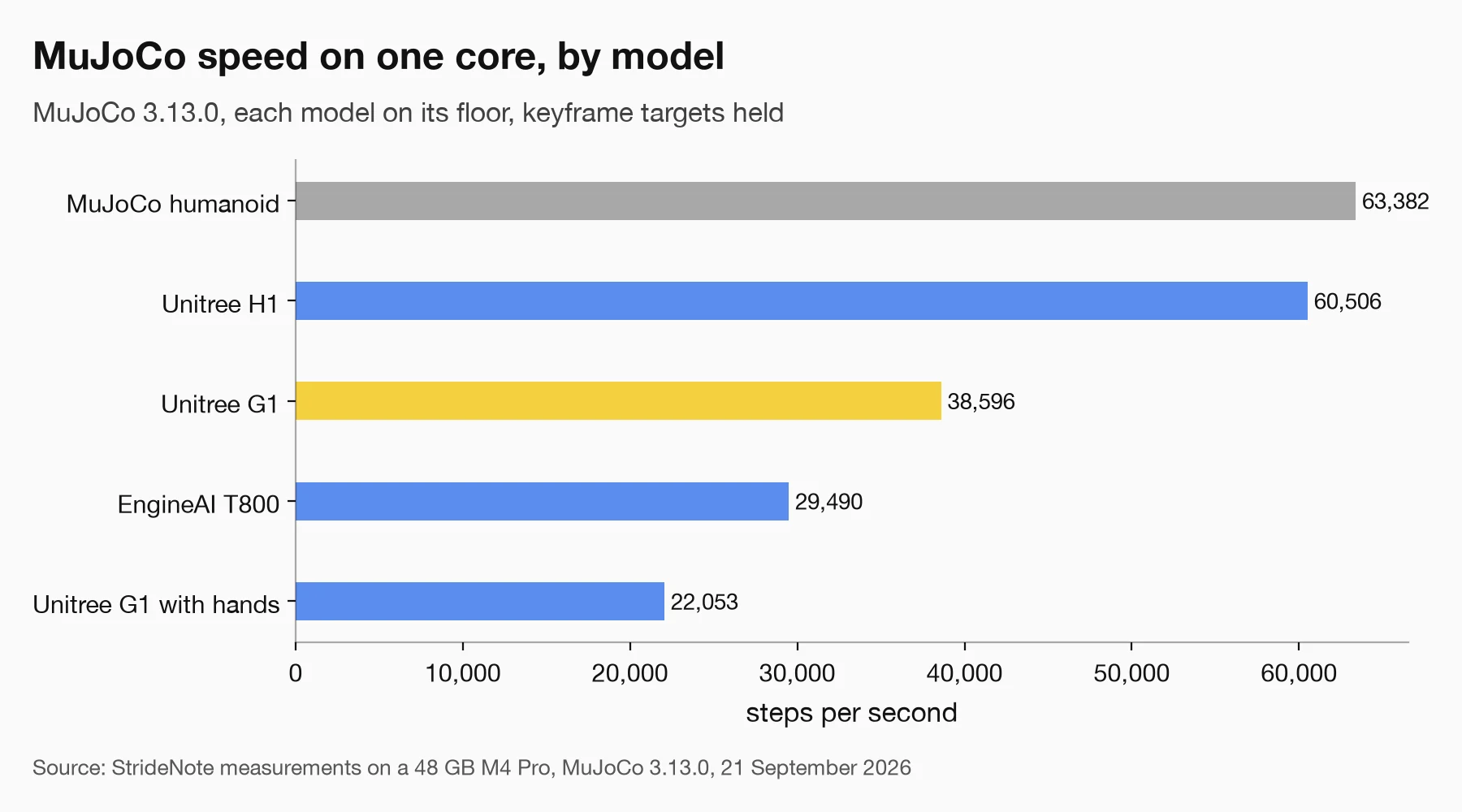
One core, each model standing on its floor. The G1 with hands has the most joints of the five and runs slowest. Measured on our test machine.
One number we are not quoting deserves a sentence. A second T800 file from the same source stepped about five times faster, because it has no floor: the robot was falling through empty space with nothing to collide with. A benchmark can look fast because it measures the wrong thing, the same trap we found when our prompt processing test turned out to be timing a cache.
What to know before simulating a humanoid robot in MuJoCo on a Mac
Two robots from the same MuJoCo Menagerie collection behave in opposite ways the moment you press play.
Five seconds of simulation with no controller on either robot. The G1 holds its pose; the H1 collapses. Rendered offscreen on our test machine.
Unitree’s G1 holds its standing pose, because its model drives each joint with a position servo: give a joint a target angle and it holds it. Unitree’s H1 collapses within two seconds, its pelvis dropping from 0.98 metres to 0.10, because its joints are raw torque motors that hold nothing until someone writes a controller. EngineAI’s T800 model behaves like the H1. Neither is broken, and a first-time user who loads the H1 and watches it fall has done nothing wrong.
The second surprise came when we rendered this piece’s videos at 1280 by 720. The G1 model refused, with an error saying the image was taller than its framebuffer, which is 480 pixels high unless a model sets it otherwise. Two lines before creating the renderer fix it:
model.vis.global_.offwidth = 1280
model.vis.global_.offheight = 720
Every measurement in this piece, with the scripts that produced it, is in our dataset, published under CC BY 4.0, with the scripts under MIT, so the numbers can be checked on another Mac.
On an M4 Pro, the physics is not the slow part. MuJoCo’s humanoid runs more than 300 times faster than real time on a single core, which means a Mac is a serious machine for learning robot simulation, as long as you run the viewer through mjpython and keep the spaces out of the path.