An IP address is a weak identifier. It changes when you move, it is shared across a household, and it tells whoever receives it very little on its own. A persistent identifier written to your disk is a different thing entirely: it survives reboots, network changes and holidays, and it is what turns a scatter of anonymous requests into one continuous profile of a single machine.
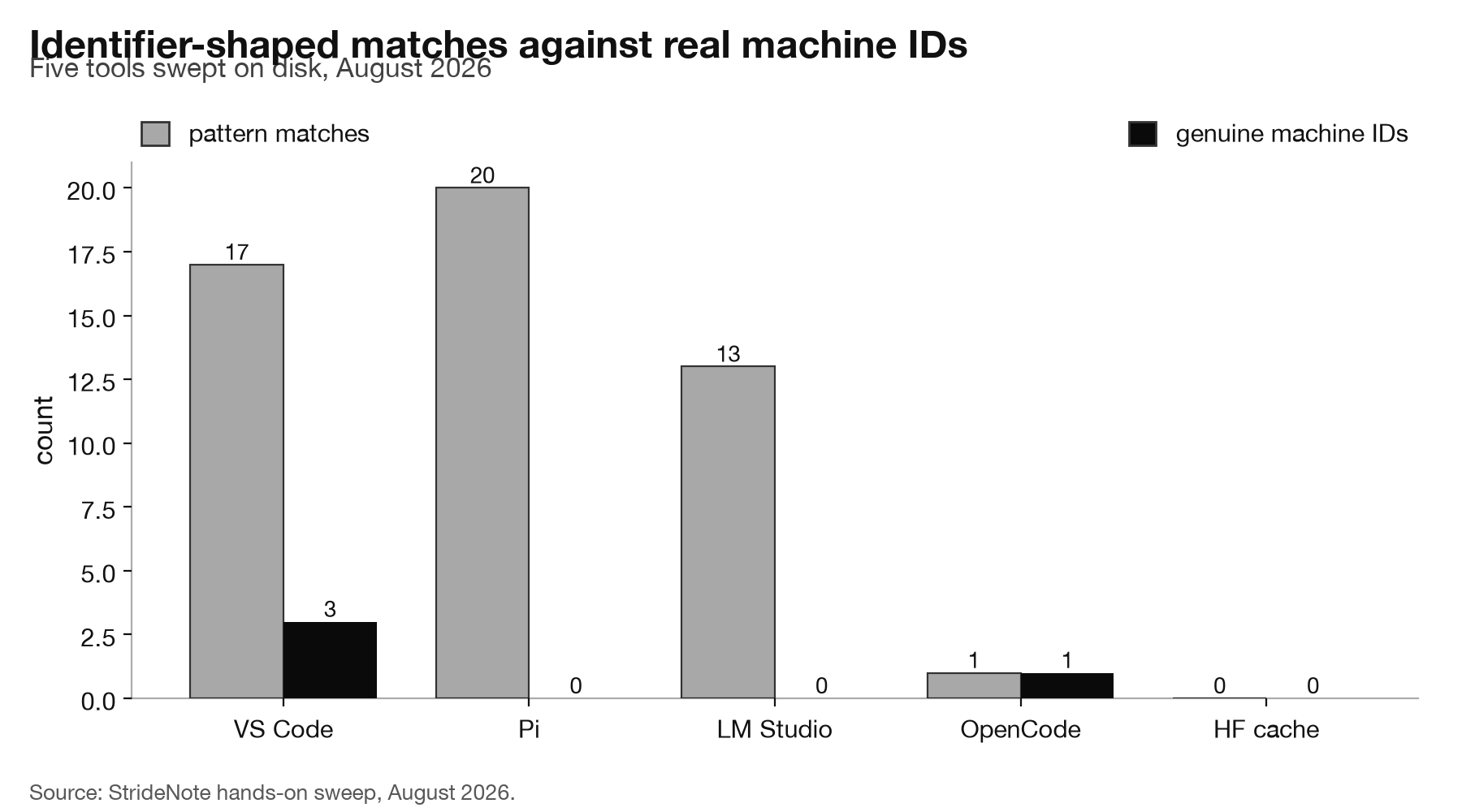
We swept five tools installed on a studio work/test stack, an Apple M4 Pro with 48 GB of unified memory, looking for identifier-shaped values in everything each one writes to disk. A pattern search says four of the five carry one. Reading what those values actually are brings it down to two.
What counts as a machine ID?
The distinction that matters is not the shape of the string but its lifetime and its scope.
A UUID generated fresh for each conversation and written to a local log is not a tracking identifier. It exists so the application can tell one session from another, it never leaves your machine, and there are as many of them as you have had conversations. A UUID written once at install time to a dedicated file, and read on every launch thereafter, is the opposite: one value, permanent, and useful to a server precisely because it does not change.
Both look identical to a regular expression. That is why the search results below needed a second pass.
Which tools actually ship one?
Two of the five, and both of them keep it somewhere obvious.
Visual Studio Code carries three. Its storage.json holds twelve keys in total, and three of them are identifiers: telemetry.machineId, telemetry.sqmId and telemetry.devDeviceId. Microsoft documents this openly in its telemetry documentation, and the naming leaves nothing to interpretation. A quarter of the global storage file is devoted to identifying the installation.
OpenCode carries one. It writes a file named .updaterId into its application support directory, containing a 36-character hexadecimal value. The file was created the day the application was first run and has not changed since. Its stated purpose is the update mechanism, which is a reasonable thing to need an identifier for, but the property that matters is unchanged by the reason: it is one stable value tied to this installation. OpenCode is also the tool we found contacting a crash-reporting endpoint on launch, so it is the one install here where a persistent identifier and an outbound connection both exist.
The three that looked guilty and were not
This is the more useful half of the exercise, because each false positive has a different cause.
LM Studio returned thirteen matches. Every one is inside liblmstudio_bindings.node, a compiled binary, and the same matches repeat across four bundled llama.cpp backend versions. Compiled objects are full of identifier-shaped constants: build GUIDs, library identifiers, symbol data. None of it is written at install time and none of it describes your machine. Its settings file, which is where a per-install value would live, contains no identifier key at all. That is consistent with what we found when we audited its network behaviour and turned up no telemetry keys either.
Pi returned twenty matches. All of them are session log filenames, and the giveaway is the count: there are twenty-one distinct UUIDs across those files, one per conversation. An identifier that multiplies every time you use the tool is the definition of a session identifier, not a machine one. It is also written only locally.
The Hugging Face cache returned nothing at all, which is worth stating because the CLI is the component most likely to talk to a remote service in normal use.
So the honest tally is two of five, and the two are the ones that keep their identifier in a file whose name says what it is.
How to check your own machine
The method is short and it works on any application, not only these.
Look for identifier-shaped values in what the app writes to disk, then apply three filters before believing any of them. Is it inside a compiled binary? Then it is a build artefact. Are there many of them, growing with use? Then they are session identifiers. Is it one value, in a small file or a settings key, created when you installed the app and unchanged since? That is a machine ID.
Electron applications make the last case easy to spot, because the framework encourages storing this kind of state in a predictable location under application support, and the app API is where that path is defined.
A fourth filter is worth adding for anyone repeating this on a tool we did not cover. Check the file’s
creation date against the day you installed the application. A machine ID is written once, at first run,
and never again; OpenCode’s dates from the day the app first opened and has not been touched since. A value
that keeps changing its modification time is doing some other job, and a value created long after install
was probably generated in response to something rather than assigned to you.
Two limits on what we did. We inspected files at a fixed depth and skipped caches and model directories, so a determined search could turn up more. And a persistent identifier existing on disk does not prove it is transmitted; proving that needs the socket work we did separately. What this sweep establishes is narrower: which tools have given your installation a permanent name, and which have not.
The reason to care is the same reason local AI and privacy keeps producing surprises. The tools here are not doing anything covert, and two of them are doing nothing at all. But an identifier plus any outbound request is a different privacy proposition from an outbound request alone, and that combination existed on exactly one of the five installs we looked at.