The moment a developer starts a local model on a Mac and waits for the first token to appear is often the moment they start weighing whether a cloud API call would just be easier. On March 30, 2026, Ollama released a preview of version 0.19 that changes that calculation. The new release replaces the llama.cpp Metal backend with Apple’s own MLX framework on Apple Silicon, delivering a 93% improvement in decode speed and a 57% improvement in prefill speed on supported hardware, according to Ollama’s official benchmarks. Those numbers are not incremental. They are a structural shift in how Mac hardware runs local models.
The change is architectural, not cosmetic. Ollama has used llama.cpp (via the GGML/Metal pathway) as its default inference engine since the project launched. MLX is Apple’s own array computing framework, purpose built for the unified memory architecture of Apple Silicon. Moving to MLX means Ollama now talks directly to the hardware in the language the hardware was designed to speak. For Mac users running local AI, that distinction shows up in every interaction.
What does the MLX backend change on Mac?
MLX, short for Machine Learning eXploration, is an open source framework Apple introduced in 2023. Its defining characteristic is unified memory access: CPU and GPU operate on the same data without copying it between separate memory pools. That is not how traditional GPU computing works. On most systems, the CPU writes data to one memory region, copies it to GPU memory, the GPU processes it, and the result copies back. On Apple Silicon, MLX eliminates those transfers entirely.
Until Ollama 0.19, the project relied on llama.cpp’s Metal backend to run inference on Mac GPUs. That approach took GPU kernels originally written for CUDA and translated them to Metal Shading Language. The translation layer worked, but it left performance on the table. Ollama’s announcement says the move to MLX lets it take advantage of the unified memory architecture of Apple Silicon.
The result is a backend that maps model data and key-value caches directly onto Apple’s memory architecture. The model spends less time waiting on memory transfers and more time computing tokens. On the M5, M5 Pro, and M5 Max chips, Ollama also gains access to the GPU Neural Accelerators, hardware circuits inside each GPU core that accelerate MLX compute graphs directly. The llama.cpp Metal backend cannot use those accelerators because it still routes through translated CUDA patterns.
How much faster do local models actually run?
Ollama’s published benchmarks use Alibaba’s Qwen3.5-35B-A3B model, a 35-billion-parameter mixture-of-experts architecture, on identical Apple Silicon hardware. The comparison is between Ollama 0.18 with Q4_K_M quantization and Ollama 0.19 with NVFP4 quantization.
| Metric | Ollama 0.18 (llama.cpp) | Ollama 0.19 (MLX) | Improvement |
|---|---|---|---|
| Prefill speed | 1,154 tok/s | 1,810 tok/s | +57% |
| Decode speed | 58 tok/s | 112 tok/s | +93% |
| Decode speed (int4) | n/a | 134 tok/s | +131% |
The benchmark data was generated on March 29, 2026, using Ollama’s own testing infrastructure. Prefill speed matters for how quickly the model starts answering after you hit enter. Decode speed matters for how fast the response streams back. A 93% improvement in decode means a response that took ten seconds now takes just over five. At int4 quantization, Ollama reports 134 tokens per second decode, a 131% improvement over the 0.18 baseline.
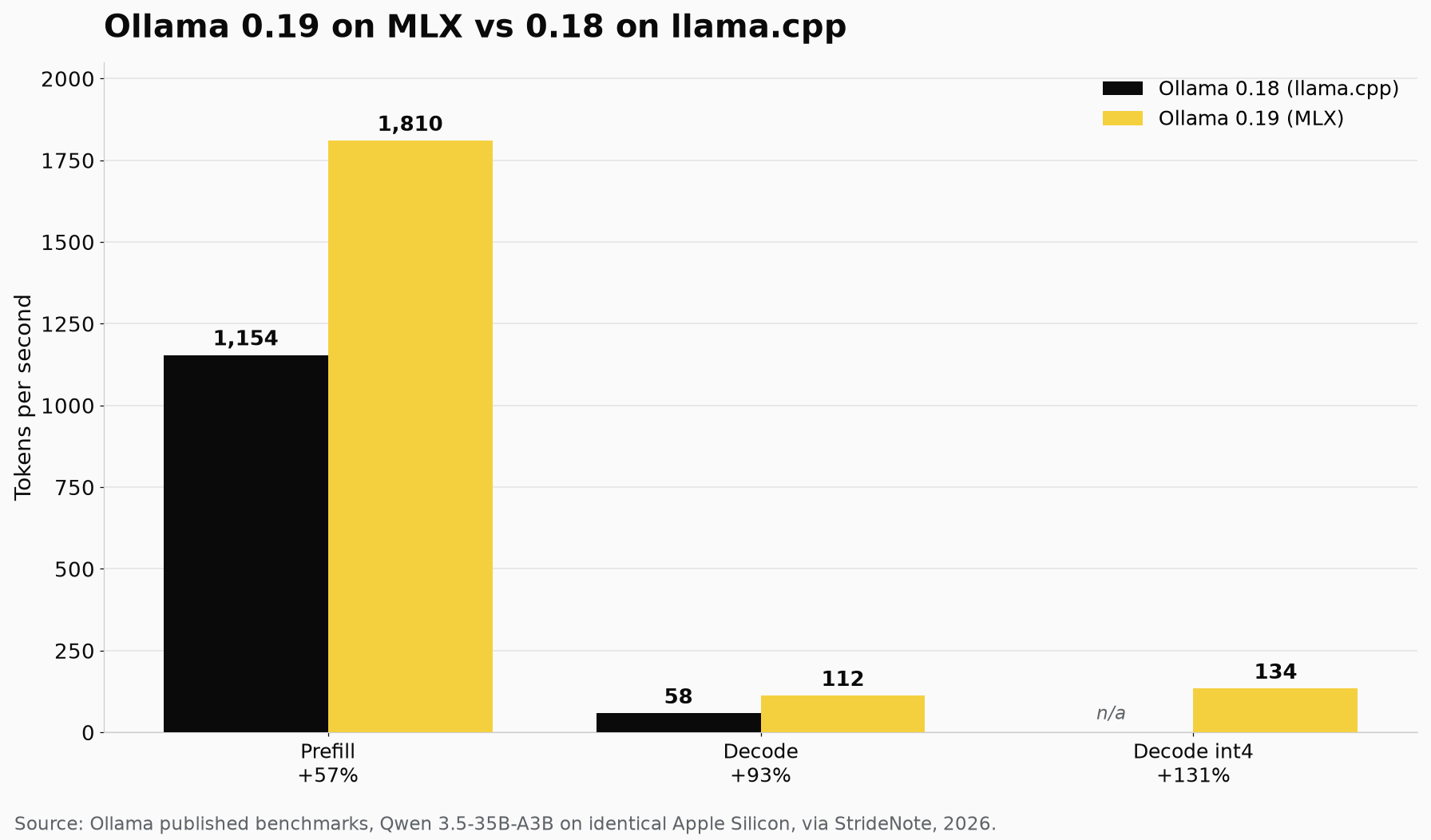
Ollama 0.19 on MLX against 0.18 on llama.cpp, same Qwen 3.5-35B-A3B model on identical Apple Silicon. Decode nearly doubles.
Why does the NVFP4 format matter for local development?
The performance numbers above combine the MLX backend with NVIDIA’s NVFP4 quantization format. NVFP4 is a 4-bit floating point format designed to maintain model accuracy while cutting memory bandwidth and storage requirements. It is the same quantization format used by cloud inference providers.
Ollama now supports NVFP4 natively, according to the official announcement. That means a developer running Qwen3.5 locally on a Mac gets output that matches what the same model produces on NVIDIA GPUs in a data center. For teams that iterate locally before deploying to cloud inference, this consistency eliminates a source of drift that has plagued local development workflows.
The format also opens the door to models optimized through NVIDIA’s Model Optimizer, which prepares models for NVFP4 inference. Ollama states that other precision formats will be added based on partner demand, but NVFP4 is the first and currently the primary quantization pathway for the MLX backend.
How does improved caching help agentic and coding workflows?
Ollama 0.19 also ships redesigned cache behavior, and the improvements target exactly the use cases where Mac users feel memory pressure most acutely.
The cache now persists across conversations. When a tool like Claude Code or OpenClaw sends multiple requests with the same system prompt, Ollama reuses the cached computation instead of reprocessing the shared prefix each time. That lowers memory utilization and speeds up branching conversations. Ollama’s announcement says the cache upgrade is meant to make coding and agentic tasks more efficient, where shared system prompts create heavy repetition across turns.
Ollama also introduced intelligent checkpoint snapshots. Instead of caching the entire prompt as a single block, the system stores snapshots at strategic positions. When a new request arrives with a slightly different continuation, Ollama only processes the delta rather than the full prompt. Smarter eviction keeps shared prefixes alive longer, so dropping an old branch does not invalidate the cache for active ones.
These changes matter because agentic workflows generate long contexts. A coding agent might hold 32,000 tokens of conversation history and system instructions. Without efficient caching, every new turn reprocesses the entire context, eating into the memory budget and slowing response times.
Which Macs can run the MLX backend?
Ollama requires a Mac with more than 32 GB of unified memory for the MLX preview. This is not an arbitrary gate. The models that benefit most from the MLX backend, starting with Qwen3.5-35B-A3B, need the memory headroom to avoid swapping. On machines with 16 GB or 24 GB, the MLX backend does not activate and Ollama falls back to the llama.cpp Metal backend automatically.
The MLX backend is enabled by default on Apple Silicon Macs with sufficient memory. No configuration flag is needed. Older Macs with Intel processors continue using the existing backend unchanged.
The M5 Max configurations with 48 GB or 64 GB are the ideal target for this release.
What does model support look like now and next?
The MLX preview launches supporting a single model: Qwen3.5-35B-A3B. That is a narrow starting point, but the Ollama team has moved quickly to expand coverage.
Since the initial 0.19 release, contributors have merged several significant MLX PRs into the Ollama codebase. Support for Gemma 4 landed in mid-April through pull request 15244, adding a full MLX implementation of Google’s latest architecture. The M5 Neural Accelerator optimization shipped in a follow-up PR that required building two MLX binaries for backward compatibility with pre-M5 Macs. Mixed-precision quantization, closure fusion for activation functions, and NVFP4 model optimizer import have all been merged in subsequent releases.
The team has stated they are working through architectures one at a time, prioritizing the most popular open-weight models. Each architecture requires a dedicated MLX implementation because the compute graph shapes differ, but the benefits apply universally once a model is ported.
The MLX preview also changes how Ollama launches models. The new ollama launch command connects a running model directly to an application like Claude Code or OpenClaw, starting the Ollama server, loading the model, and passing the endpoint to the target app in a single command. For users already running Ollama in a RAG or assistant setup, updating to 0.19 means the MLX performance gain applies automatically as model coverage expands.
Apple’s own investment in MLX continues as well. At WWDC 2026, Apple held a dedicated session on building local agentic AI on Mac using MLX, demonstrating the full stack from MLX-LM through MLX-LM Server to agent frameworks. The session positioned MLX as the foundation layer with Ollama, LM Studio, and vLLM as the application layer built on top.
The MLX preview is still labeled as a preview. Ollama has not announced a timeline for when it will exit preview or how broad model support will need to be before that happens. But the gap between what a Mac can do with local models today versus three months ago is wider than at any point since Apple Silicon launched. That gap will only grow as more architectures land on the MLX backend and more developers build workflows that assume local inference, not cloud API calls, as the default.
We measured the engines against each other, one model and one Mac, in MLX vs llama.cpp vs MetalRT.
One consequence of the MLX move took us by surprise. NVFP4, an NVIDIA format, reached Ollama through the MLX engine and therefore runs on macOS and nowhere else. We follow that through in NVFP4 on Apple Silicon.