People ask which one to use as if there is a single winner. There is not. These three tools answer three different questions, and we run all three in the studio for different jobs on the same machines. The trick is knowing which question you are actually asking.
- Ollama is the foundation: the easiest way to download, run, and serve models.
- MLX is the fast one: Apple’s own framework, built for Apple Silicon, when speed is the priority.
- Jan is the friendly one: a normal desktop app for people who will never open a terminal.
What is the difference between Ollama, MLX, and Jan?
Ollama is a single binary and a small server. One command pulls a model, and it listens on http://localhost:11434 with an OpenAI-compatible API so other tools can plug in. It is the thing we install first on any new machine.
MLX is Apple’s machine-learning framework, written from scratch for Apple Silicon’s unified memory. Paired with the mlx-lm package, it is the fastest way to run a model on a Mac. It is Python-first, so using it well means a little code.
Jan is a desktop chat app that bundles its own runtime. Download it, pick a model from a Hub, and chat. No terminal, no Python, no Docker. It is the lowest-friction path to a first local model.
How much faster is MLX on a Mac?
This is the part that changed in 2026. Ollama now uses Apple’s MLX as its acceleration path on Apple Silicon, so the engine most people already run inherits much of MLX’s speed automatically. The old story, a large and simple gap where running MLX directly was far faster than Ollama, has mostly closed for everyday use. Where direct MLX still wins is at the edges: the newest optimizations land there first, and long batch jobs, evaluation runs, and fine-tuning pipelines benefit from its raw throughput and Python control. For a one-off chat you will not feel any of it; for an hour-long grind, the direct path can still save real time.
The cleaner way to think about it now: Ollama for running, MLX for building. If you only ever pull and run models, Ollama on MLX is the whole answer. If you want to fine-tune a model on your own data, convert weights, or sit closest to Apple’s latest kernels, that is when you drop down to MLX directly and accept the Python setup that comes with it.
Ollama is plenty fast for interactive use, and faster now than it was, precisely because it sits on MLX under the hood. Jan, running its bundled runtime through an Electron app, carries the most overhead of the three, which is the cost of being the friendliest.
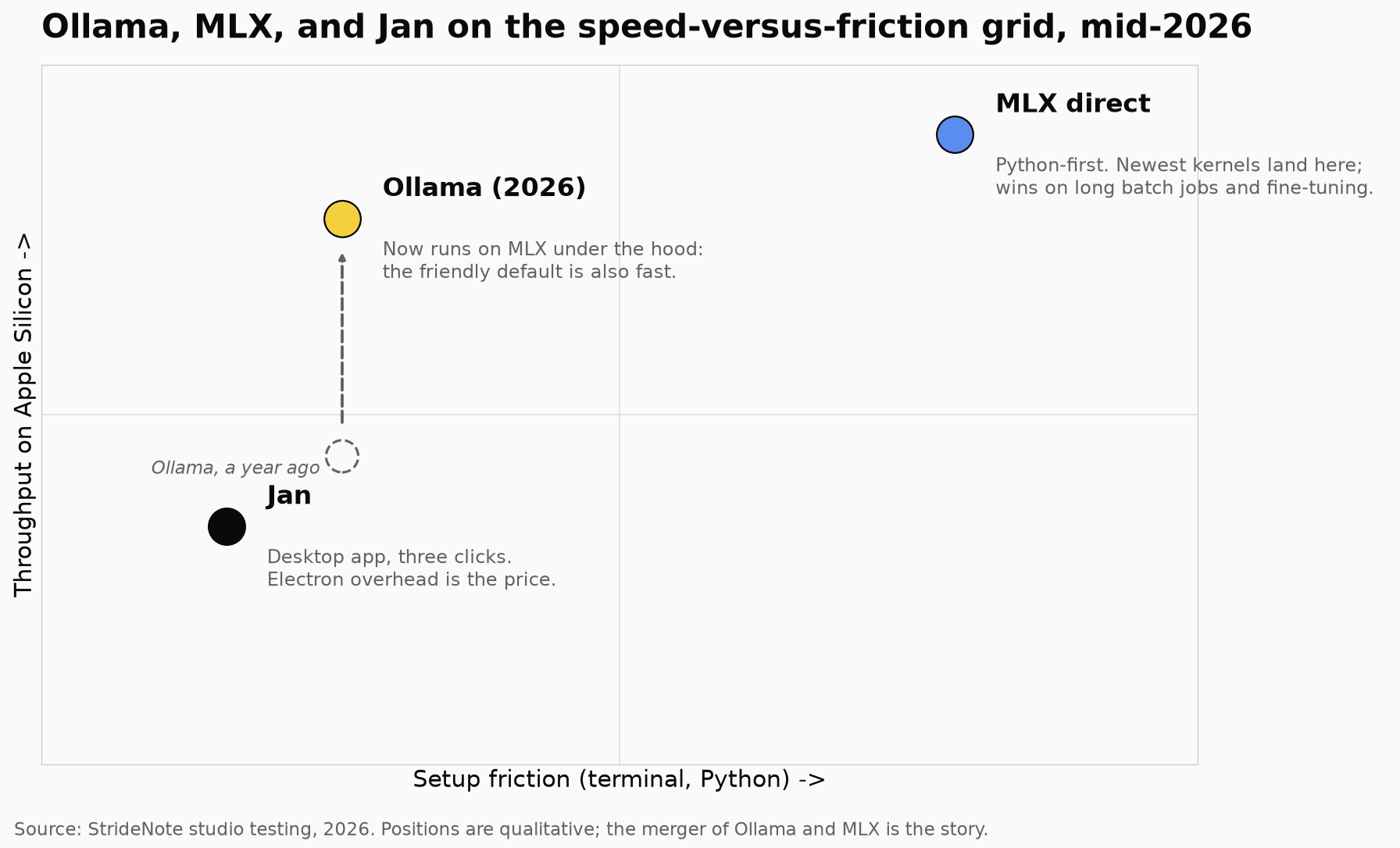
Where each tool lands on speed versus setup friction. The story of 2026 is Ollama adopting MLX under the hood, so the friendly default is now also fast.
Which is easiest to set up?
Jan is three clicks to a working model: open, pick from the Hub, chat. It is the tool we hand to someone who would otherwise never try local AI, because the barrier was never the model, it was the terminal.
Ollama is one command and forgiving. MLX is the most setup: Python environments, pip, and sometimes converting a model into the MLX format if it is not already on the mlx-community hub. That friction buys you speed and a fine-tuning pipeline, but it is friction.
The detail that bites: separate model stores
This trips people up, so plan for it. Jan’s bundled runtime keeps its own model store, separate from Ollama’s. A model you download in Jan does not appear in Ollama, and vice versa, unless you configure Jan to use Ollama as a remote backend. If disk space matters, do not download the same 4GB model twice. Either centralize on Ollama and point Jan at it, or accept two stores on purpose.
A few honest trade-offs
- MLX is Mac-only and Python-first. A strength on Apple Silicon, a non-starter anywhere else, and it expects you to be comfortable with venvs and pip.
- Jan is Electron. A few hundred megabytes of RAM go to the UI before the model loads. On a 16GB Mac running a 7B model, it gets tight.
- Ollama’s memory is sticky. A loaded model stays in RAM until something bumps it. Use
ollama psto check.
Which one should you run?
Run Ollama if you want one tool that does almost everything and plugs into everything else. This is the default, and for 95% of our work it is the answer.
Add MLX if you are on Apple Silicon and you have jobs that run long enough for a 30 to 50% speedup to matter, or you want to fine-tune. It is our second-tier daily driver: Ollama when convenience wins, MLX when speed wins.
Choose Jan if you, or the person you are setting up, will not open a terminal. It is the friendliest first taste of local AI, and the one most likely to actually get installed; if a chat UI is all you want, the Open WebUI versus Jan question is the next one to settle.
Which do we run, and why?
All three, deliberately. Ollama is the foundation we build on, and since it now runs on MLX it is fast enough that we reach for direct MLX less often than we used to. MLX comes out for batch work and evaluation runs where the clock matters. Jan is what we recommend for someone taking their first step, because a normal-looking app gets opened and a terminal command does not.
If you only take one thing: start with Ollama. It is the foundation the other two relate back to, and the one the rest of a local AI stack plugs into. Add MLX when speed becomes the bottleneck, and keep Jan around for the people you are bringing along.
The merger of Ollama and MLX is the quiet headline here. A year ago these were three clearly separate points on a speed-versus-friction grid; now the friendly default is also the fast one, which makes the decision easier rather than harder. Pick Ollama, and add the others only when a specific need, raw throughput or a zero-terminal setup, actually asks for them.