The model on your laptop cannot send your work anywhere. The agent wrapped around it can, and one of the sixteen we tested sent a whole conversation, file contents included, the moment we rated an answer.
The Local Agent Telemetry Report 2026 is the second telemetry report from Stridenalysis, the research desk of StrideNote. It follows the Local AI Telemetry Report 2026, which covered the tools around a local model. This one covers the agents that act on your files: OpenJarvis, OpenCode, Pi, Hermes Agent, DeepSeek Harness, Cline, OpenClaw, Codex CLI, Aider, Kilo Code, Goose, OpenHands, Grok Build, ZeroClaw, smolagents and Google ADK. Each ran on our test machine, an Apple M4 Pro with 48 GB of memory, against the same local model, with no account signed in, on the same small task. We recorded every request each one tried to make. The report grades all 41 findings by the strength of the evidence, and the dataset behind every chart is published with it.
The PDF is free. Enter your email in the download box and it opens straight away.
A desktop case outside the coding agents is ArtCraft telemetry, which reached two trackers before any sign-in.
What did the local agent telemetry report find?
The task prompt never left the machine. Every agent sent it to the local model and nowhere else, and the marker word we planted in the task appeared in no outside request we could read.
Five agents reported usage before we had agreed to anything. Pi sends an install ping and says so in its own settings guide. Codex CLI exported four batches of usage metrics to an OpenAI address, 717 KB in all, carrying the model name and the exact operating system version, with a local model and no OpenAI account. Kilo Code sent a launch event to PostHog with location lookup left on. OpenJarvis sent one event per session in July, the finding carried over from the first report. And Cline’s command line sent 37 events of 24 kinds for a one-line task, each tagged with a device ID that is the SHA-256 hash of the Mac’s hardware UUID. That ID does not change when the agent is reinstalled. Cline ignores Do Not Track, and we found no setting in the command line that turns the reporting off.
Update, 19 October 2026: two findings here have changed since we tested. Cline’s documentation, revised on 7 October, now names an off switch for its command line, telemetryOptOut in its global settings file. We tested version 3.0.64, which had none; the CLI is now at 3.0.73. OpenJarvis merged a change on 14 October that makes its analytics opt-in; the newest desktop release is still the one we tested. We have not retested either tool, so the figures on this page describe the versions named.
One agent uploads the conversation itself. DeepSeek Harness 0.1.5 changed its telemetry default from off to feedback. Rating an answer sends the full session log: 24 records and 90 KB, with the prompt, the replies, the system prompt, the file the agent wrote and the folder path inside. The only warning is placeholder text in the feedback box. Normal use sent nothing, and the switch that stops it works, but it appears in the package files and not in the main README.
One agent borrows another program’s sign-in. Hermes Agent reads the refresh token that Claude Code keeps in the macOS Keychain and posts it to Anthropic at launch, even when only a local model is configured. We turned off every startup setting Hermes documents and the refresh still ran. Our proxy held the request, so Anthropic never received it.
Several agents change the machine they run on. OpenCode installed a new version of itself six seconds after launch, before anything was typed. OpenClaw downloaded a helper program from GitHub on a connection that went past our proxy. Kilo Code ran Homebrew, which contacted Homebrew’s own analytics address. OpenHands pulls a repository of skills on every launch.
Three agents sent nothing of their own. ZeroClaw and smolagents made no outside request at all. Google ADK’s only request came from a library fetching a price list, and one documented setting stops it.
How did we test sixteen agents on one Mac?
Every agent got its own empty home folder, so it saw none of our real settings or accounts. We gave it one provider, LM Studio on the same machine, and one model, Gemma 4 31B QAT. The task asked it to create one file containing one marker word and nothing else.
While each agent ran, we listed every network connection held by every one of its processes, four times a second. We also routed its web traffic through a capture proxy in hold mode: the proxy wrote down each request, then answered it on the machine instead of passing it on, so no test data reached any vendor. Where an agent let us set its own reporting address, we pointed it at a collector on the machine and read the payloads there. That is how we read Codex’s metrics, DeepSeek Harness’s session upload and Aider’s opt-in analytics byte for byte.
Each finding sits on the highest step of an evidence ladder we could reach for it. Grade A is a capture: 36 of the 41 findings rest on a request we read in full. Grade B is a connection we watched without reading, because it refused our certificate: four findings. Grade C is code we read without seeing it run: one finding, carried from the first edition. The method is the one we set out in how to prove your data never leaves. The OpenCode desktop case below shows the same steps on a single build.
Two rules held throughout. A string in a binary shows that the bytes are there, and only the code around it or a request we recorded shows what it does. The report lists seven leads that looked like telemetry and were not. And a report that asks readers to trust its method should show where the method slipped, so Section 6 records five things that went wrong in our own testing, including the one run where the proxy was left out.
Which settings make each agent quiet?
Seven of the sixteen can be made fully quiet with settings their makers document: OpenCode, Pi, DeepSeek Harness, Goose, Google ADK, ZeroClaw and smolagents. We tested every switch on the version in the report and counted what was left afterwards.
Eight cannot, because at least one request has no switch that we found. Codex still fetches an announcement file. Kilo Code still fetches its model list. Hermes still refreshes the Claude Code sign-in. OpenHands still pulls its skills repository. OpenClaw still downloads its helper on first launch. Cline sends everything regardless. Section 7 of the report carries the exact settings for each agent, and a chart of what each one sent at default and with every documented switch set.
Goose is the one agent of the sixteen that asks first. Its consent screen lists what it collects and says conversations and code are never included. The selector starts on Yes, so pressing Enter agrees. Aider asks one install in ten, decided on the machine from a random identifier, and sends nothing to the other nine.
The checks from the first report still apply to agents. Watch the sockets at launch before you type anything. Read the settings file for keys named for telemetry or analytics. Look for the address a reporter sends to, because a library with no address sends nothing. The identifier sweep in the first report shows how to tell a build constant from a machine identifier, which is the difference between Kilo Code’s random ID and Cline’s hardware hash.
Does the OpenCode desktop app send telemetry?
Yes, to Sentry, and the command line result above does not carry over to it. In August we inspected the OpenCode desktop app, version 1.16.2, on the same test machine. The bundle holds a complete production configuration, not a placeholder:
VITE_SENTRY_DSN: https://<key>@o<org-id>.ingest.us.sentry.io/<project-id>
VITE_SENTRY_ENVIRONMENT: production
VITE_SENTRY_RELEASE: desktop@1.16.2
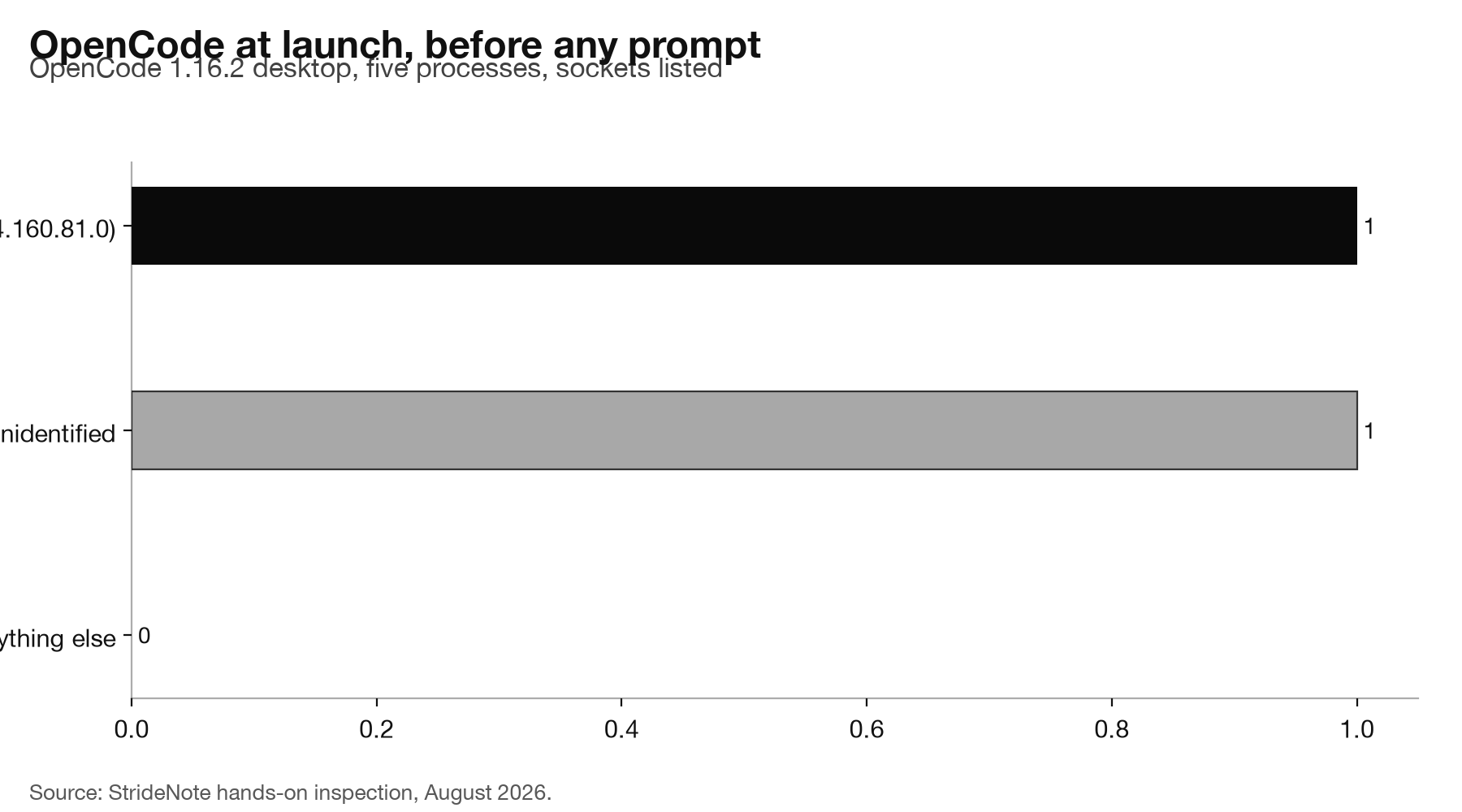
A DSN is the developer’s own project address, so its presence with a production environment and a release matching the app version marks a deliberately wired integration. We launched the app and listed every socket held by its five processes. Two outbound connections were established with no prompt typed and no project open:
OpenCode  <local>:<port> -> 34.160.81.0:443
OpenCode  <local>:<port> -> 104.16.6.34:443
The ingest.us.sentry.io host in the DSN resolves to 34.160.81.0, the first address. The second, 104.16.6.34, sits in Cloudflare space and does not match the addresses opencode.ai resolves to. The bundle references opencode.ai/config.json and opencode.ai/desktop-theme.json, so a configuration or theme fetch is the likely candidate, but we did not confirm it.
Per Sentry’s own documentation on data collected, a browser or Electron SDK sends error events with stack traces, the release and environment, OS and runtime versions, breadcrumbs of recent activity, and the request’s IP address. Whether personally identifying data travels depends on a sendDefaultPii flag, whose handling is present in the bundle. OpenCode’s init call filters the Breadcrumbs integration out of Sentry’s default set, which our July reading of the bundle found in place. The realistic exposure is your operating system, app version, IP address and the contents of any error, and a stack trace from a tool that handles file paths can contain file paths. We did not induce a crash, so we cannot say what a real OpenCode error event holds.
The desktop build ships 41 OPENCODE_DISABLE_* flags, and none of them controls the Sentry connection. A team that needs a quiet machine can standardise on the command line, which this report found can be made fully quiet. A team that wants the desktop app should treat the crash channel as on, with no off switch, until a release documents one. Record the exact version with the approval, run the socket check on a clean user account and keep the output, and if stack traces leaving the machine is a problem for your clients, ask the vendor in writing what an error event contains and how long it is kept. Look for a telemetry setting in the app and in its documentation too, because a DSN says nothing about whether an opt-out exists.
Two leads in that bundle were false, and both looked stronger than the real finding. Fifteen hits for amplitude were all one DOM attribute table from a bundled rendering library, where amplitude is the SVG filter attribute used by feFuncR and its siblings:
alignmentBaseline:null, alphabetic:VE, amplitude:VE, arabicForm:null, ascent:VEMore than 150 references to opentelemetry, including protobuf definitions for metrics, traces, logs and collector endpoints, had no collector URL. What is present is the set of environment-variable names the OpenTelemetry SDK reads, OTEL_EXPORTER_OTLP_ENDPOINT among them, so it sends nothing unless you set that variable yourself. A grep count is not a finding. The DSN survived because it is not the kind of string that arrives by accident.
Where can you download the report and the dataset?
The PDF runs to 48 pages with 13 figures. Inside:
- A summary of the six findings and the numbers behind them
- The method and the evidence ladder, from code reading to capture
- Results for all sixteen, with charts of who reports, what a launch carries, who hears from the most agents, and what each agent sent before and after its switches
- Findings by agent, with case studies on Cline’s device ID and the DeepSeek Harness upload
- Seven false leads, five things that went wrong in our testing, and the switches for every agent
- Limitations, the six tests planned for the next edition, the dataset, the sources and a glossary
The dataset, agent-telemetry-2026.csv, has one row per finding: agent, version, test date, evidence grade, method, destination, trigger, what is sent, whether the work content is included, whether it is on by default, and what we found of an off switch. The raw captures, socket listings and screen recordings behind every row are kept with it.
The report and its dataset are licensed CC BY 4.0. Copy them, share them and build on them, with credit to StrideNote. The permanent record is on Zenodo under DOI 10.5281/zenodo.22969237. To cite it: StrideNote (2026) Local Agent Telemetry Report 2026. Edited by StrideNote Studio. StrideNote Telemetry Report, edition 2. No company named in the report paid for it or reviewed it before publication. If you find an error, write to us at the address on our About page and the correction will appear in the next edition.
What will the next edition test?
This edition tested the command line form of each agent, on a local model, signed in to nothing, for a few minutes at a time. Each of those choices leaves a gap, and the report names six tests that close them. Signed-in runs for Kilo Code, Cline and Grok Build, whose code defines events that only fire with an account. The editor extensions of Cline and Kilo Code, run inside the editor with the editor’s own traffic separated out. The desktop apps of OpenCode and Hermes. A working day per agent instead of minutes, to catch reports on long timers. The two payloads that refused our certificate, Goose’s analytics and OpenClaw’s download, with a capture method that does not change system trust. And release tracking: the same task on each new version of the sixteen, with any change in defaults recorded.
Both reports now sit on the Reports shelf. An agent that is absent from either has not been cleared by us. It has not been tested yet, and DeepSeek Harness, which changed its default between two releases a month apart, is the reason a result from September is a result for September.