A progress bar sat at one third for forty minutes, under the words “Starting server.” Nothing else moved. We had just installed the OpenJarvis desktop app on a studio test machine, an Apple M4 Pro with 48 GB of memory, and it never finished setting itself up. Then we quit an unrelated program, and the app started working immediately. The thing it needed was port 8000, which our image pipeline was holding. OpenJarvis never said so.
We dropped OpenJarvis from our stack on 31 May 2026, and the reason we wrote down was that it was terminal-only. Six days before we wrote that, the project had shipped a desktop app. We went back to check what we got wrong, and found that we had been wrong three times, once about the software and twice about our own tests.
What is OpenJarvis, and who builds it?
OpenJarvis is an open-source framework for personal AI agents that runs on your own device, built at Stanford’s Scaling Intelligence Lab by Jon Saad-Falcon, Avanika Narayan, John Hennessy, Christopher Re and Azalia Mirhoseini, according to the lab’s project page. It is Apache 2.0 licensed. The pitch rests on a measurement from the team’s Intelligence Per Watt study: local language models and local accelerators can accurately service 88.7% of single-turn chat and reasoning queries at interactive latencies.
The name is the promise. This is the assistant that answers when you speak to it and does things on your behalf, running on hardware you own. The command surface backs that up. Beyond the chat commands there are agents, messaging channels for iMessage and SMS, connectors for Gmail and Obsidian, a morning digest, a benchmark runner and an evaluation framework. It is not a chat box with a local model behind it.
Why did we drop OpenJarvis, and what changed since?
Our own record is specific. We installed it with uv tool install OpenJarvis, confirmed that jarvis ask returned a local answer through Ollama, and marked it tested. Five weeks later we marked it dropped, and the note we left said it was command-line by default, that the optional HTTP server still needed a separate chat client, and that the agent slot in our studio was already filled.
That verdict was accurate about our workflow and wrong about the software. The desktop build, tagged desktop-v1.0.2, was published on 25 May 2026. We wrote the drop note on 31 May. A graphical client had existed for most of a week, and we did not look. The install command in our notes is also dead. It is not how the project ships now.
The install path moved to a single line, curl -fsSL https://open-jarvis.github.io/OpenJarvis/install.sh | bash, per the project repository. It handles uv, a Python virtual environment, Ollama, and a starter model. On macOS it also fails partway through the first time you run it. Ollama’s own installer replaces /Applications/Ollama.app and then calls open -a Ollama by name. The launch database has not registered the new bundle yet, open reports that it cannot find an application named Ollama, and because the OpenJarvis script runs under set -euo pipefail, the whole install stops there. It never reaches the step that puts the jarvis command on your path. Running the same command a second time completes the install, because Ollama is present by then. We reproduced this on a clean machine.
The desktop app arrived, universal, 42 MB, notarized under a Developer ID belonging to Jon Saad-Falcon, the same researcher listed first on the Stanford post. Gatekeeper accepts it without complaint. That is more care than most research code gets.
Two installer behaviours are worth naming. It posts install progress to an analytics endpoint before it asks you anything, and the shell function that gates this is analytics_enabled() { return 0; }, which is to say it always reports. Setting OPENJARVIS_ANALYTICS_HOST redirects the beacon, which is what we did, but no flag switches it off. Separately, unless you pass --no-bg-orchestrator, it detaches a background process that downloads the model it thinks your hardware wants plus the next size up. Neither is hidden. Both are in the script. Neither is mentioned before you run it.
Does the OpenJarvis desktop app work on a Mac?
Yes, once you find the thing it will not tell you.
For three launches the app opened, reported the inference engine and the model as ready, quietly pulled another model, and then sat on “Starting server” forever. It printed nothing to standard output or standard error, wrote no log we could find, and started no backend process. We stopped ComfyUI, which had been running since the previous afternoon, and OpenJarvis came up on its own within seconds: a chat window, a dashboard, data sources, agents, a live power reading of 18.0 W, and a panel comparing the cost of the answer you just got locally against what a frontier cloud model would have charged. It answered through its own OpenAI-compatible endpoint in four seconds.
The app binds port 8000. ComfyUI was holding it. That is the entire failure, and the app never says the word “port.”
We nearly published the opposite, twice. Our first diagnosis was that a missing server dependency was the cause, because the command line, which fails loudly where the app fails silently, refuses to start jarvis serve and prints the fix. That is a real gap in the installer, and it was not what was wrong with the app. Our second diagnosis was that a port conflict had been ruled out, because we changed the configured port and nothing improved.
That test was worthless, and the reason is the most useful thing we learned. jarvis serve lists its port as “default: config”, so we changed the port in config.toml and expected the app to follow. It cannot. The desktop spawns its server with --port on the command line, and an explicit flag beats a config file.
Then we got the explanation for that wrong too. We first wrote that the port test failed because OpenJarvis keeps two installs with separate settings. It keeps two installs, and they share one settings file. The command line lives in ~/.openjarvis. The desktop ships a second copy of the same project in ~/OpenJarvis, about 936 MB of code between them. But core/paths.py honours only OPENJARVIS_HOME and XDG_DATA_HOME, and the app sets neither. The OPENJARVIS_ROOT it does export is read by the desktop shell and never by the Python package. Two installs of the code, one config.toml, and a port that neither of them takes from it.
Port 8000 is not an obscure choice. It is the default for vLLM, which OpenJarvis’s own evaluation code assumes. Anyone running a local inference server or an image pipeline is likely to be sitting on it.
What does OpenJarvis send home, and can you turn it off?
Telemetry does not stop at the installer, which is the part we had missed. posthog is a runtime dependency of both virtual environments. In core/config.py the analytics block ships enabled, carrying a hard-coded project key and a host at https://34.231.106.201.sslip.io, flushed every 30 seconds. Do not confuse it with the separate local telemetry that writes throughput and energy figures to a SQLite file on your own disk. That one is why the app can tell you it is drawing 18.0 W, and it goes nowhere.
Reading the code is not proof, so we ran the beacon into a listener of our own. We pointed the analytics host at 127.0.0.1, started the server, and sent one inference: a single question whose answer was the word “pineapple.” With analytics at its shipped default, exactly one HTTP request left for the endpoint. Then we set the switch, restarted, and sent the identical question to the identical model. Nothing left at all.
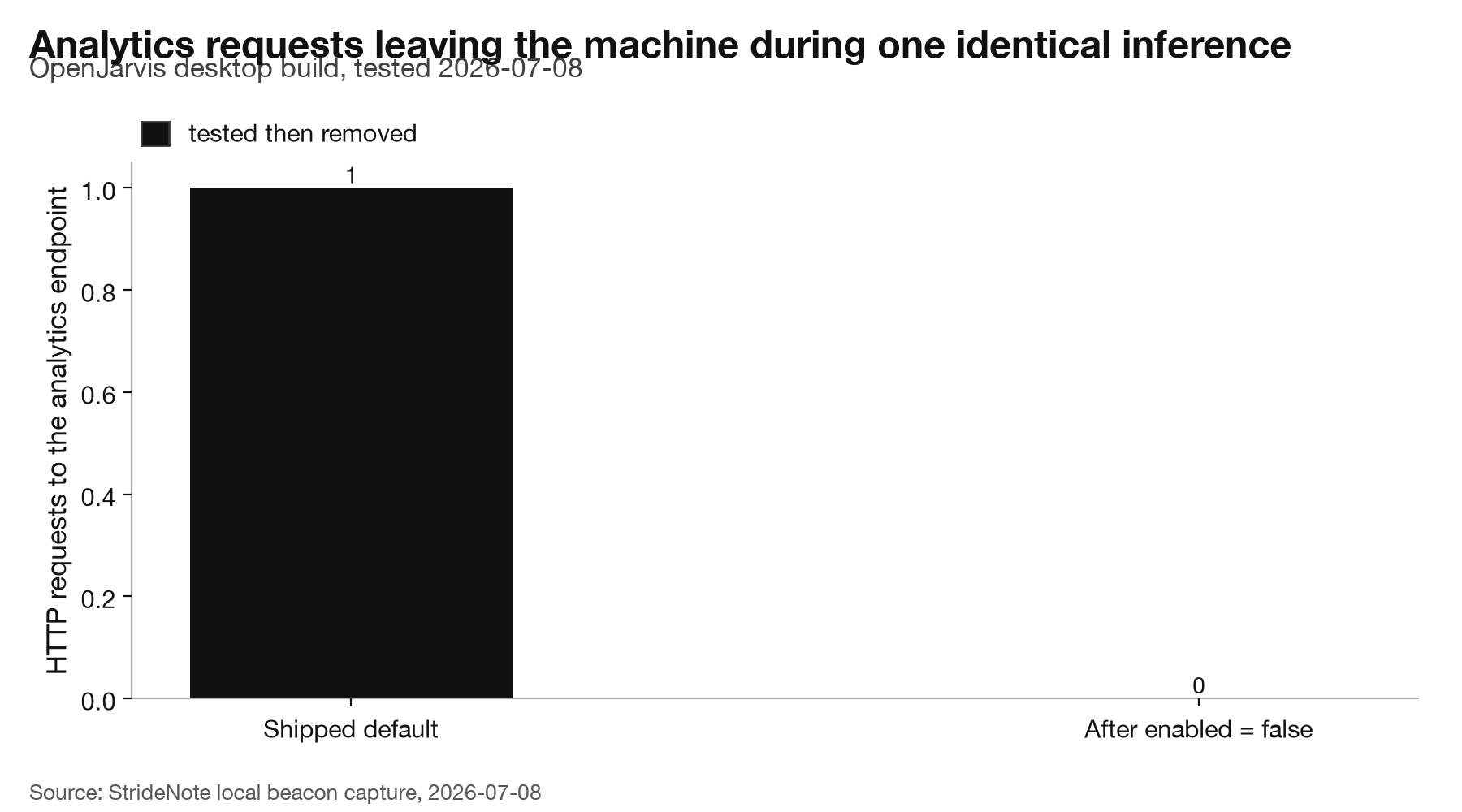
One question, one model, one server. The only change was the analytics switch. StrideNote local beacon capture, 8 July 2026.
What the one request contained matters as much as the fact of it. The event was chat_session_ended. Its properties were turn_count, tokens_in, tokens_out, two latency percentiles, tool counts, an error count, a duration, a hashed model name, the operating system, the Python version, and the PostHog library version. The anonymous install UUID identified it. The words “pineapple” and “say” appeared nowhere, and no message content field was present at all. The project’s claim that it sends no chat content survived a test designed to catch it lying.
The documentation is where this falls down. docs/telemetry.md is better than most: two redaction layers, a structural allowlist, no chat content, no prompts, no file paths, 365 days of retention. It opens by promising to explain “how to opt out”, and then never does. There is no opt-out section. The one control it names, jarvis analytics reset-id, does not exist. The underlying reset_anon_id() function sits in analytics/identity.py with nothing wired to it, and jarvis has no analytics command at all.
The switch that works is undocumented. Put enabled = false under an [analytics] heading in ~/.openjarvis/config.toml. The server then builds no client, and the endpoint the interface reads for its identity answers enabled: false with an empty key, which is what stops the browser half from reporting too. Shipping analytics on by default is a choice a research project is allowed to make. Publishing a page that says it will tell you how to leave, and then not telling you, is a different kind of choice.
Is OpenJarvis worth installing on your Mac?
The command line works well. jarvis doctor gives 11 passed, 18 warnings and 0 failures. jarvis ask returns a local answer in about six seconds through Ollama and qwen3.5:2b. jarvis serve needs the server extra that the installer omits, and after that the OpenAI-compatible API listens in about three seconds. The desktop app, once it has its port, answers in four.
Cost shows up in two places. The first is the prompt. The command line defaults to the orchestrator agent, which carries a large tool prompt, and a six-word question burned 4,438 prompt tokens before the model wrote anything. The desktop runs the simple agent and spends none.
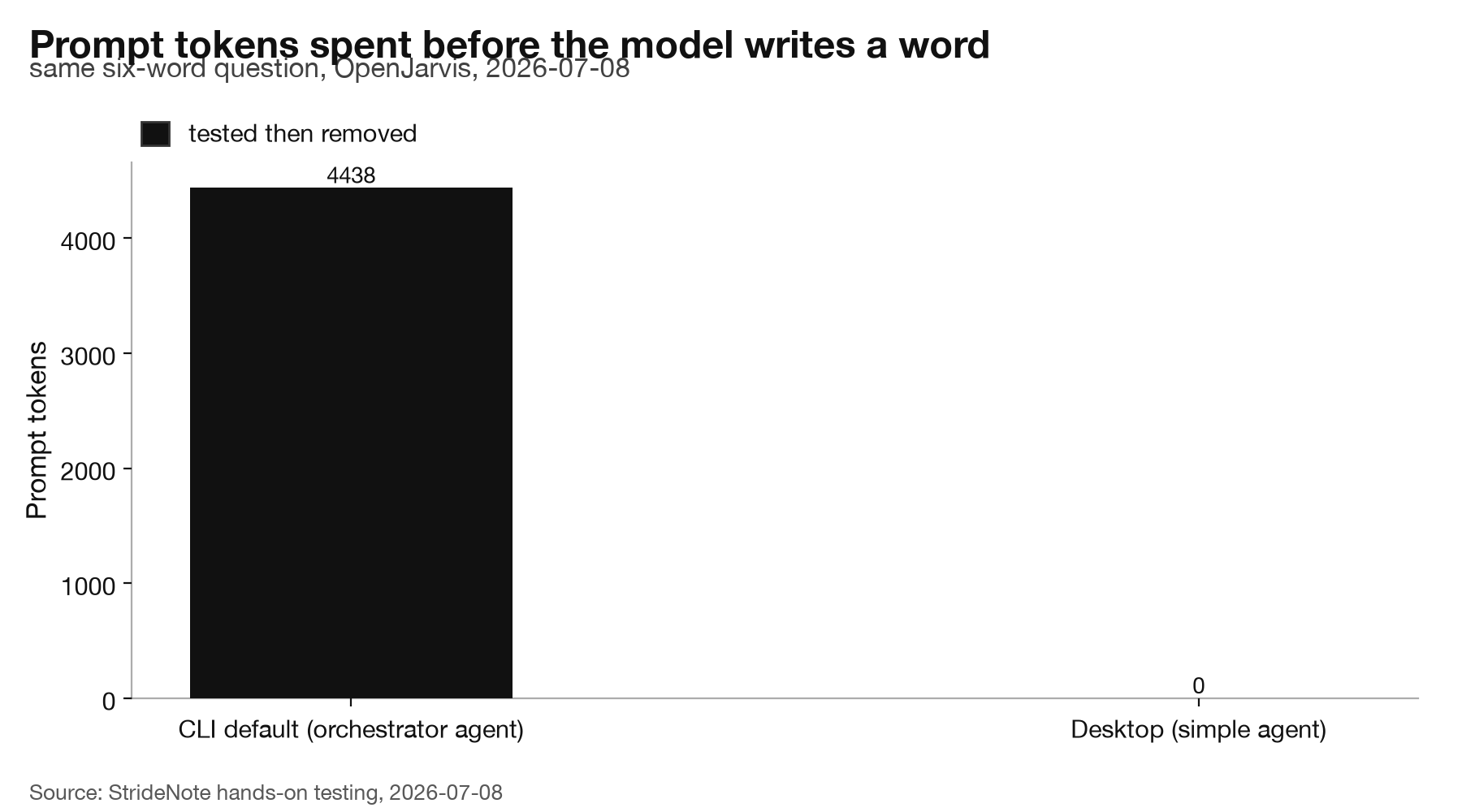
The same six-word question, asked two ways. StrideNote hands-on testing, 8 July 2026.
The second is disk, and this is where the background orchestrator earns its warning. Left alone, it pulled qwen3.5 at 0.8b, 2b, 4b and 9b, one size at a time. While we were running the telemetry test, hours after we thought we had stopped it, the Ollama daemon resumed a pull we never asked for: five connections to the model registry, a single partial blob that reached 16 GB, arriving at about 32 MB per second. We killed the app, booted out two launchd jobs, and watched free space stop falling at 120 GB. The model directory now holds 26 GB, most of it a download nobody wanted, alongside 19 abandoned partial blobs.
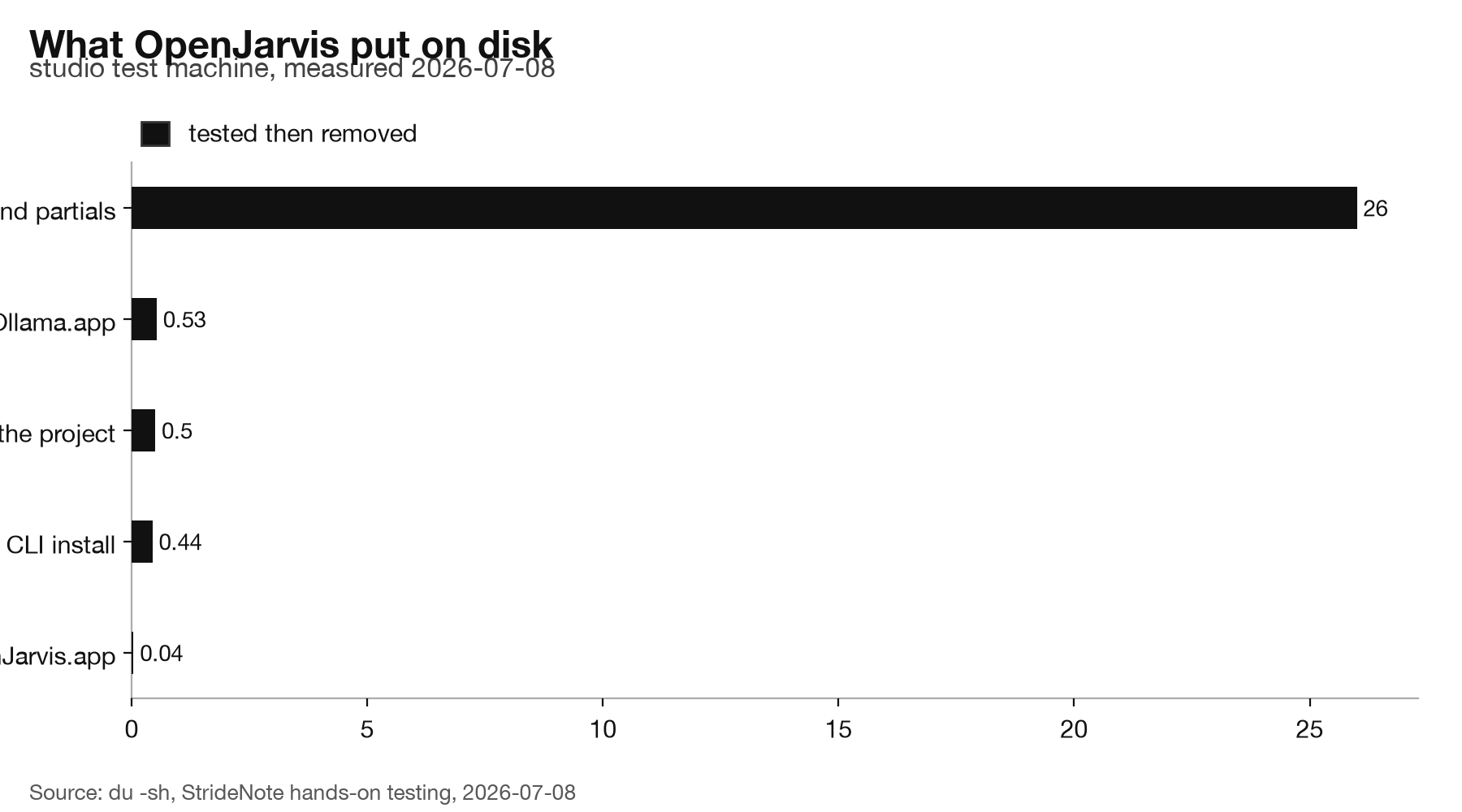
Measured with du on the studio test machine, 8 July 2026. Pass --no-bg-orchestrator and the 26 GB never arrives.
One more oddity. jarvis doctor reports that Apple Silicon energy monitoring is not installed while the NVIDIA equivalent is, which is strange for a project whose headline argument is energy per query, though the desktop app still displays a power figure.
We are not putting OpenJarvis back into the studio, and it has little to do with quality. The assistant slot is filled by the always-on agent we built on Hermes and LM Studio, which answers on Telegram and runs on the same box, and the engine question was settled when we worked through choosing between Ollama, LM Studio and MLX for our local AI stack.
What changed is the reason, three times. In May we wrote that OpenJarvis was terminal-only. It was not. In July we spent an afternoon convinced its desktop app was broken. It was not. Then we explained that failure with a two-config theory that was also wrong. Every time, the software was fine and our test was not.
So we went and pointed the same instrument at the coding agent we actually use every day, expecting it to come out clean. It did not. That is the next piece, and it is less comfortable than this one. The habit worth keeping is not suspicion of research code. It is that a claim about what software sends is worth exactly as much as the capture you ran to check it.