Ask two of your coding agents to write the same commit message and you will get two different writers. One hedges, one clears its throat, one reaches for “delve.” We ran three agents across one studio, OpenCode for the desktop work, Hermes for the always-on assistant, and Pi in the terminal, and the fastest way to spot which one drafted something was the voice. The fix was not three sets of instructions. It was one brand voice, written once, and pointed at all three through a single file each agent already reads. That file, AGENTS.md, is an open format used by more than 60,000 open-source projects and now stewarded by the Linux Foundation’s Agentic AI Foundation, and it works across more than twenty agents including OpenCode and Pi, according to the AGENTS.md specification.
This is the wiring playbook. The case for why voice is worth the effort lives in brand voice for AI agents; this piece is the setup. Every behaviour described below was checked against the tool itself, not its marketing, and one of the three failed the check.
What file do OpenCode, Hermes, and Pi all read?
All three read AGENTS.md, a plain markdown file at the root of your project. It is a README for agents: the place you put the instructions a human contributor would not need but an agent does. Because the format is shared, one file speaks to every agent that supports it, and the agent reads the nearest one in the directory tree, so a project can override a global default.
The reason this matters for voice is that it turns “sound like us” into a file the machine loads on every task, not a hope. Put the voice rules where the agent already looks, and the rules travel with the work. The same shift we described in what agentic changed for local AI applies here: once the config is shared infrastructure, the thing you put inside it is what sets you apart.
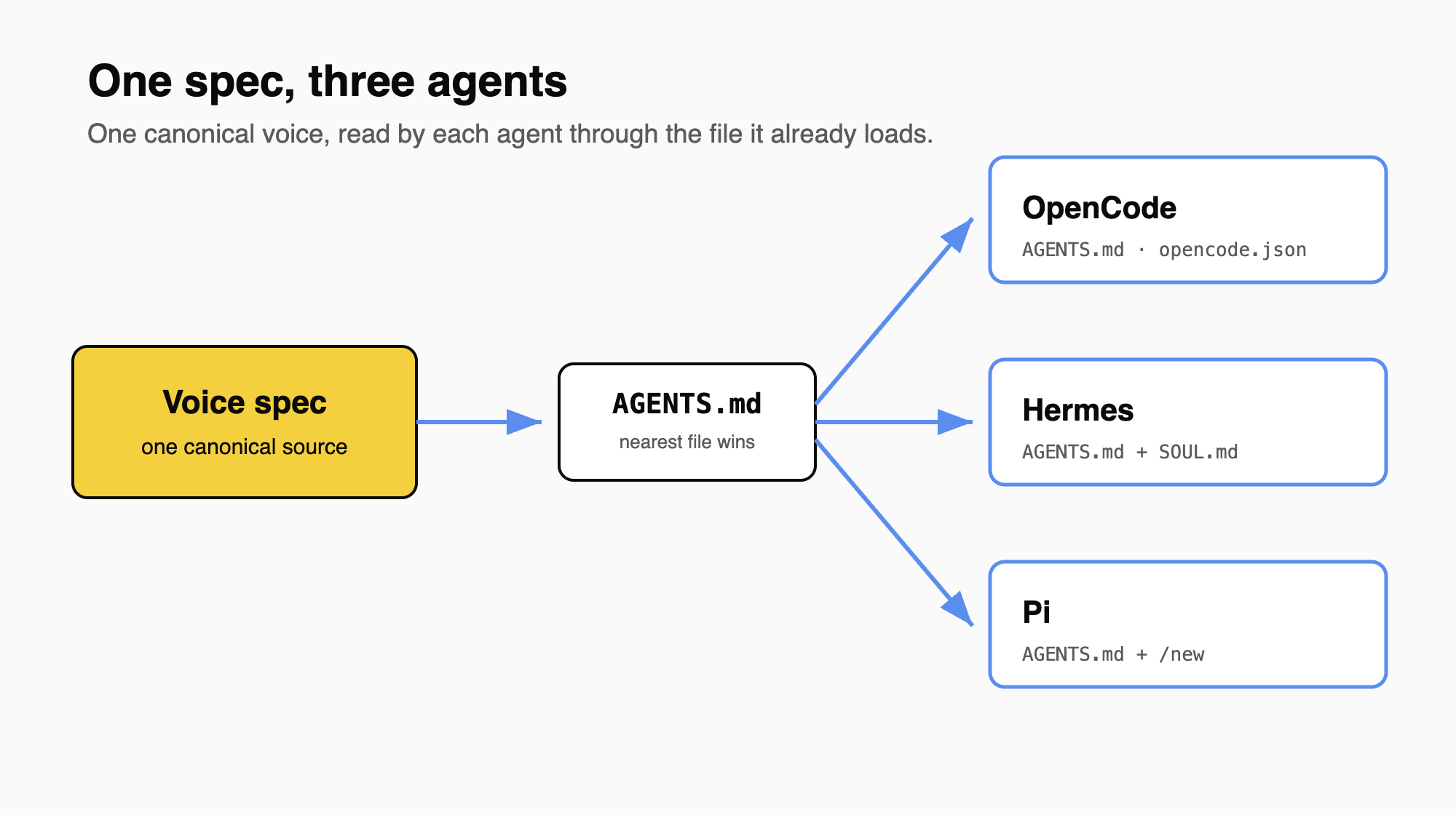
How do you write the brand voice once?
Before any wiring, the voice has to exist as a spec, not a mood. Ours is a small set of markdown files: a universal floor every context inherits (banned words, structural tics, formatting rules), then one ceiling per kind of writing (articles, essays, scripts), plus a pass or fail checklist the output has to clear. The full method is in brand voice for AI agents. Keep the files in one place and treat that copy as canonical. Everything below just points at it.
How do you add the brand voice to OpenCode?
OpenCode reads AGENTS.md from your project root, and you create or update one with the /init command, per the OpenCode rules documentation. The naive approach is to paste the whole voice into that file, but that copy will drift from the canonical one within a week.
The clean approach is to reference the voice files instead of duplicating them. OpenCode supports an instructions field in opencode.json that pulls in external files, and it accepts glob patterns and even remote URLs, per the same documentation:
{
  "$schema": "https://opencode.ai/config.json",
  "instructions": ["Voices/00 The Stack.md", "Voices/01 Universal AI Hygiene.md", "Publishing/04 SEO Rules.md"]
}
Those files are combined with your AGENTS.md at load time, so the agent sees the real voice spec, and there is one copy to maintain. We confirmed the field reads external files by pointing it at a voice file and watching the rule take effect. The standing instruction in AGENTS.md does the rest: read the relevant voice file before writing, do not write from memory. When rules live behind a /init file and a checklist, “on brand” stops being a review note and becomes a step the agent runs.
How do you give Hermes the same voice?
Hermes is the always-on assistant in our stack, and it splits the job in two. The persona, who the agent is, lives in its own SOUL.md. The work rules, how it writes, come from the same workspace AGENTS.md that points at the voice files. We checked this against the Hermes package itself: SOUL.md is the persona file, and workspace AGENTS.md is loaded as project context, scoped to the active workspace so a sibling repo’s rules do not leak in. Keeping identity and craft in separate files means we can retune the writing without rewriting the character, and both load on every session. The model behind it has to hold the instructions, which is the other half of the story we told in local tool calling in OpenCode and Hermes.
What we found when we tested Pi
Pi, the terminal harness, reads AGENTS.md as a context file at startup, and it reads CLAUDE.md too, per its repository. It merges every context file it finds from the working directory up to the project root with a global one at ~/.pi/agent/AGENTS.md, so you point Pi at the voice files the same way you point OpenCode. Project-local files sit behind a trust gate: the first time Pi loads a repo you approve its files with /trust, or pass --approve for a single run, before the rules take effect.
One operational detail is easy to get wrong, and our first draft of this article got it wrong until we ran the test. Pi loads context once, at session start, and its /reload command does not re-read the voice files. We set up a project where AGENTS.md told Pi to read a voice file, and the voice file said to end every reply with a fixed marker. Pi obeyed it: the marker appeared. Then, without leaving the session, we edited the voice file to a different marker and ran /reload. Pi kept writing the old one. Run /reload and it names its own scope in the output: it reloads keybindings, extensions, skills, prompts, and themes, and context files are not on that list. A fresh session read the edited file correctly on the first try.
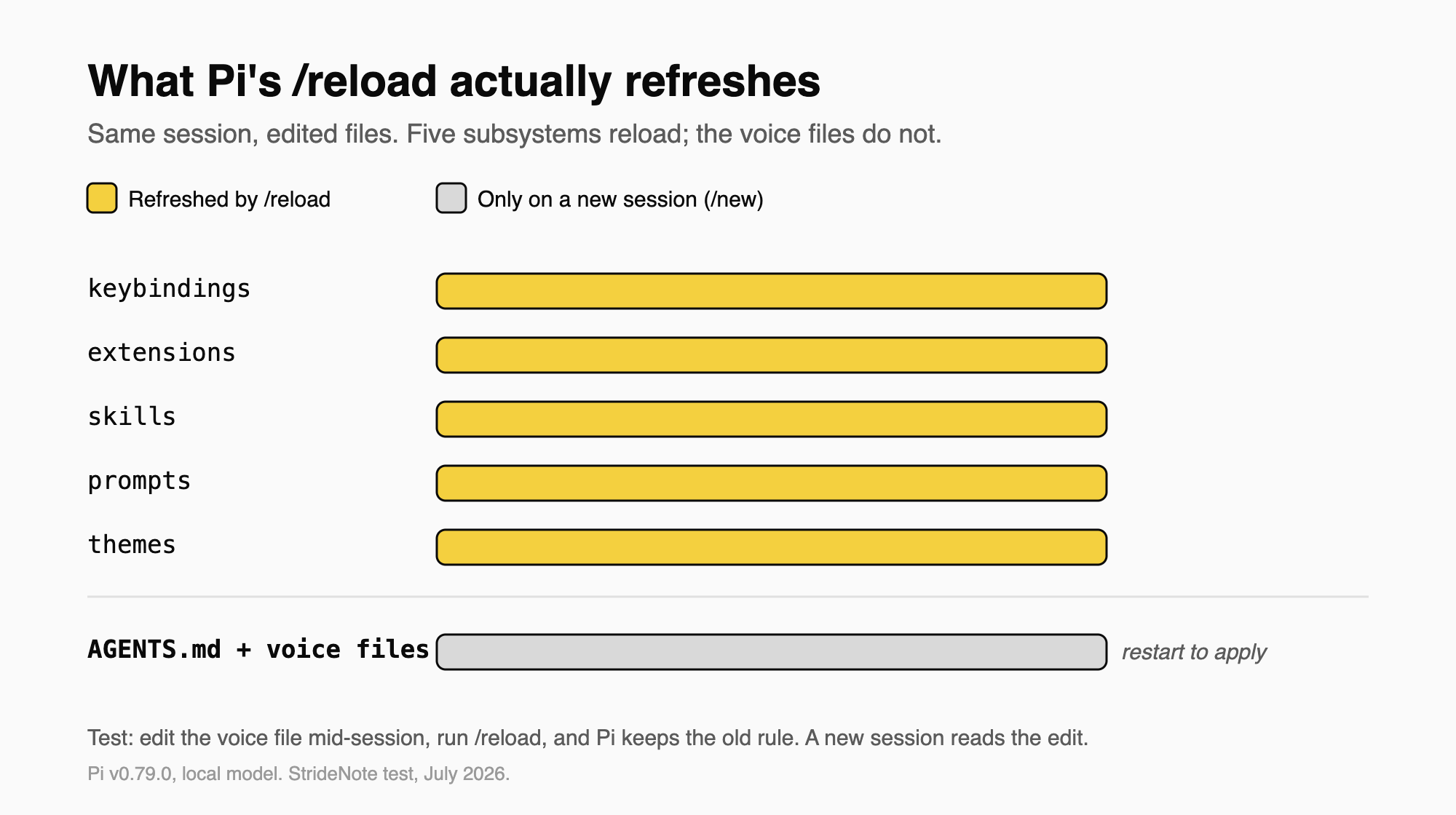
So the habit is the opposite of what the command name suggests. After you change the voice files, start a new session with /new or relaunch Pi. Running /reload leaves Pi writing to the version it read when it launched.
What each agent actually does with the voice files
The three tools agree on the file name and disagree on almost everything around it. The table below is what we verified against each tool directly, not what the docs promise.
| Behaviour | OpenCode | Hermes | Pi |
|---|---|---|---|
| Reads AGENTS.md | Yes, plus global config | Yes, workspace-scoped | Yes, plus CLAUDE.md and a global file |
| Points at external voice files via | instructions array (paths, globs, URLs) | workspace AGENTS.md, persona in SOUL.md | AGENTS.md merged up to project root |
| Picks up an edited voice file by | next run | next session | new session or restart, not /reload |
| Gate before project rules load | none by default | active-workspace sandbox | trust prompt (/trust or --approve) |
Verified against OpenCode (app plus rules documentation), the Hermes package, and Pi v0.79.0. StrideNote tests, July 2026.
How do you keep three agents from drifting?
The failure mode is not a wrong rule, it is two right rules that disagree. We keep the voice files in more than one place, and a copy fell out of sync once, so one agent read a banned phrase the other had already retired. The agent looked like it ignored us. It had simply read the stale file.
Three habits prevent it. Keep one canonical copy of the voice and have every reference point back to it rather than holding its own version. Remember that the nearest file wins, so a forgotten AGENTS.md in a subfolder can quietly override the root. And know each agent’s refresh rule, because as the Pi test showed, the command that sounds like it reloads your rules may not touch them. Gate the output on the checklist, not on a final read, so a drifted voice fails a step instead of shipping.
The models will keep converging and the agents will keep multiplying, which is the real reason to centralise now rather than later. The next thing on our list is a single check that reads all three config files and flags the moment one points at a voice the others have moved past, so the drift shows up in a test run rather than in a published sentence. The argument for why that file matters more than the model behind it is in brand voice for AI agents.